
SwiftData, a new framework introduced at WWDC 2023, provides a Swift-like API for working with persistence in iOS apps. It simplifies the usage of Core Data by offering a more user-friendly syntax, making it easier to define models, access and query data, and handle data insertion and deletion.
An important distinction to make here is that SwiftData still uses the underlying storage architecture of Core Data that iOS developers are very familiar with. SwiftData simply presents a more user-friendly syntax for working with Core Data. If you’ve worked with Core Data in the past, you’ll find SwiftData’s new syntax simply amazing.
Ever since Swift came out, using Core Data with your app has always seemed out of place. All of the “Swift-y” features that came out each year with Swift and SwiftUI were leaving Core Data, which had a deep Objective C heritage, in the dust.
A good example here is the .xcdatamodeld, or Schema Model Editor, file. This file is used to define your database’s schema.
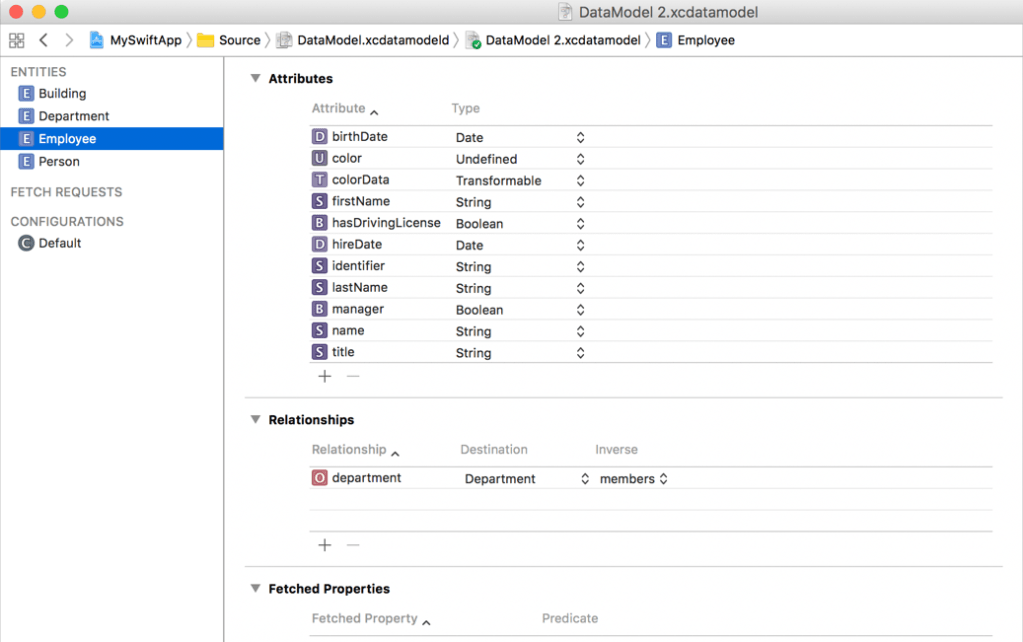
This is a convenient way to define all the elements of your model, but it feels separate from the rest of your code. In fact, the compiler uses the schema to make class files for you, but they’re located in the derived data of your project! This technique also differs from the approach taken in SwiftUI, which pushes developers toward defining everything in code instead of separate helper files like storyboards.
The introduction of Swift macros in Swift 5.9 looks like it’ll be a game changer. There’s sure to be a lot of content to cover Swift macros in the near future, so for now, here are some of the highlights while checking out SwiftData.
Here is a model for a User class
class User {
    var name: String
    var email: String?
    var hobbies: [Hobby]
}
If I were using Core Data, I’d have to go into the Schema Editor, add a new entity, and add attributes for the properties. With SwiftData, that’s all done with one addition, @Model:
import SwiftData
@Model
class User {
var name: String
var email: String?
var hobbies: [Hobby]
}That’s it! Our User class is now a valid model for use in SwiftData, which has its own import when you want to use it.
The @Model macro sets up a perfectly valid model, but you can also make customizations. For example, to ensure the email is unique, you can add a macro to that property:
@Model
class User {
    var name: String
    @Attribute(.unique) var email: String?
    var hobbies: [Hobby]
}
You can even define deletion rules for the relationships using the @Relationship macro:
@Model
class User {
var name: String
@Attribute(.unique) var email: String?
@Relationship(.cascade)
var hobbies: [Hobby]
}How do we manage persistence? Gone are the days of the Persistence.swift file for initializing the persistence stack for your app. SwiftData has a new modifier that lets you define exactly which types you want to consider part of your model:
@main
struct UserApp: App {
var body: some Scene {
WindowGroup {
ContentView()
}
.modelContainer(for: [User.self, Hobby.self])
}
}The modelContainer(for:) modifier takes an array of types you want your model to track.
Accessing data also has never been easier! With a model defined and the modelContainer injected into the environment, you can access your database entries!
@Query var users: [User]
var body: some View {
    List(users) { user in
        NavigationLink(user.name, destination: UserView(user))
    }
}
You can also customize the query to handle things like sorting:
@Query(sort: \User.name, order: .forward)
var users: [User]
var body: some View {
List(users) { user in
NavigationLink(user.name, destination: UserView(user))
}
}Adding, Updating and Deleting data is also much easier!
SwiftData has introduced a much simpler way to persist your data in your Swift apps. Thanks to Swift macros, you can instantly make your models, in code, SwiftData ready and configure them to your liking. With a new modifier, you can access the context, and with the new @Query property wrapper, you can easily perform queries.
One more cool thing is that the @Query property wrapper is all set up for Observation, so your user interface stays up to date with the database! Pretty sweet right? There’s a lot packed into a little bit of configurable syntax under the hood.
Where to Go From Here?
WWDC has a great set of videos to get an introduction to SwiftData:
I do hope you enjoyed this quick look at SwiftData, and if you have any questions or comments, please leave them below!
 Kenrick Vaz