
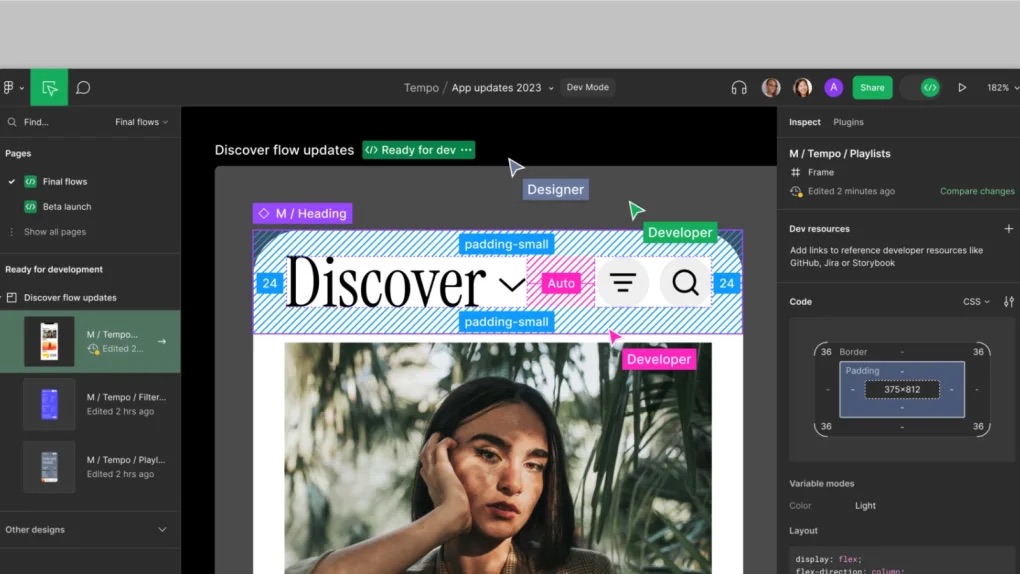
Figma’s Config conference is on at California and there have been some pretty cool and much needed announcements! According to the company, the mission of this year’s Config is to bridge the gap between design and development.
During the opening keynote, Figma announced a bunch of new tools and features, all geared towards its mission of “making design accessible to all”. Chief among them is a brand new developer mode, intended to finally bridge the gap between designers and developers. I was very surprised to hear that one third of Figma users identify as a developer, but the experience has until now been tailored for designers.
Dev Mode is a new space in Figma that makes it faster and easier to move from design to development. Designers can tag a project ’Ready for Dev‘, and developers can get the information they need and eliminating the need for version updates and extra communication. While the Figma canvas is great for freeform design exploration, it can be confusing if you’re dropped into a design file that’s missing information needed for implementation. Dev Mode is like a browser inspector for your design file, and it brings design concepts—pixels, layers, and groups—closer to developer concepts like code, icons, and tokens.
One of the features that I absolutely love is the ability to compare versions of the screen/asset. Checkout the Dev Mode teaser below
Variables
Variables is Figma’s own take on design tokens, one of the most long-requested features. Figma is introducing variables to enable teams to streamline the process of creating and maintaining multiple brands, devices, and themes. Variables make design testing, iteration, and validation more efficient so designers can shave hours off their workflow. Figma is the only tool with both theming and support for design tokens (single sources of truth that designers and developers can reference to consistently apply UI elements like colour, sizing, and more).
Here is a more detailed walkthrough of Dev Mode, Variables:
Ultimately, Figma’s development mode and variables represent a step forward in creating a more efficient, collaborative, and enjoyable workflow for both developers and designers. The seamless integration of design and development allows for a smoother handoff, reduces errors, and enhances productivity. By leveraging these features, we can dedicate more time to innovation, problem-solving, and pushing the boundaries of design and development.
I can’t wait to work closely with our Design Studio on these new features! The future of collaboration between developers and designers is brighter than ever before. :)
 Kenrick Vaz