
We’ve just begun working on an internal portal for a client. One of the things our dev team has to work on is integrating SSO for authentication. Single sign-on (SSO) is a user authentication tool that enables users to securely access multiple applications and services using just one set of credentials.
Instead of twelve passwords in a day, SSO securely ensures you only need one.
Single sign-on puts an end to the days of remembering and entering multiple passwords, and it eliminates the frustration of having to reset forgotten passwords. Users can also access a range of platforms and apps without having to log in each time.
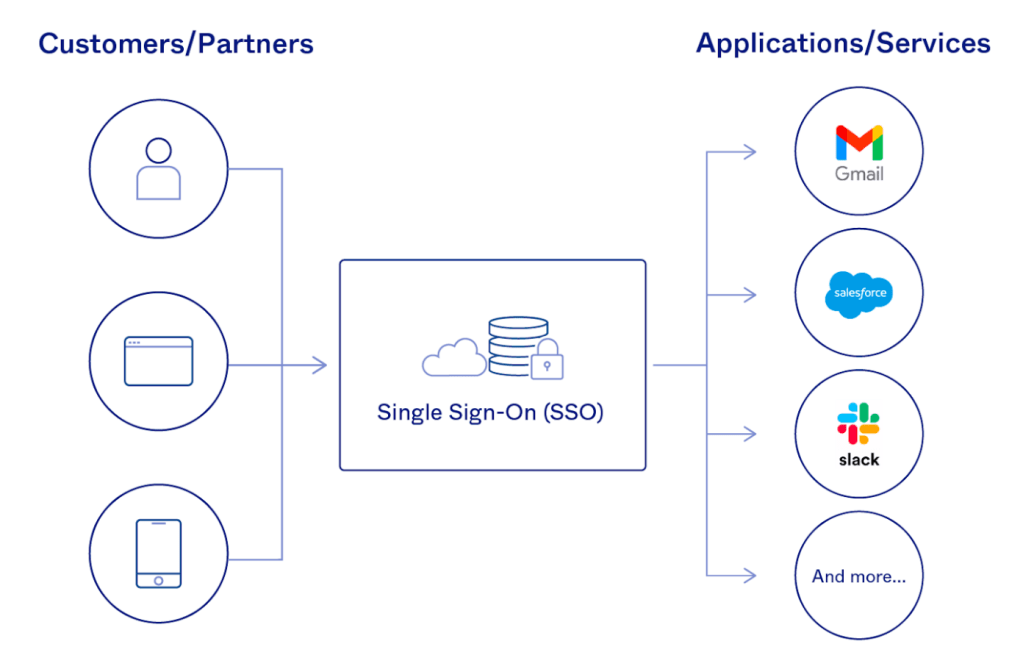
How Does an SSO Login Work?
Let’s see how SSO works with an example that we are all familiar with, accessing Gmail and YouTube

Step 1: A user visits Gmail, or any email service. Gmail finds the user is not logged in and so redirects them to the SSO authentication server, which also finds the user is not logged in. As a result, the user is redirected to the SSO login page, where they enter their login credentials.
Steps 2-3: The SSO authentication server validates the credentials, creates the global session for the user, and creates a token.
Steps 4-7: Gmail validates the token in the SSO authentication server. The authentication server registers the Gmail system, and returns “valid.” Gmail returns the protected resource to the user.
Step 8: From Gmail, the user navigates to another Google-owned website, for example, YouTube.
Steps 9-10: YouTube finds the user is not logged in, and then requests authentication. The SSO authentication server finds the user is already logged in and returns the token.
Step 11-14: YouTube validates the token in the SSO authentication server. The authentication server registers the YouTube system, and returns “valid.” YouTube returns the protected resource to the user.
The process is complete!
Here is a short video from one of my favorite tech blogs that helps illustrate SSO.
One of the key issues with SSO is that it has a lot of security implications if user credentials are compromised. IT teams use security concepts like the principle of least privilege and role-based access to ensure no user receives more permissions than they need or extensive access to apps they don’t use. Alternatively, if a user’s account is locked out for one reason or another, they will be unable to access all systems or applications that use the SSO account.
The use of multi-factor authentication (MFA) with SSO is a must. MFA provides an added layer of authentication that makes it more difficult for a malicious individual to successfully login to SSO services using stolen credentials. This significantly reduces the risk of an unauthorized user gaining access to multiple services or applications using a single account.
In conclusion, Single Sign-On (SSO) has revolutionized the way users authenticate and access multiple applications, providing a seamless experience, improved security, and enhanced productivity. As technology continues to evolve, SSO will likely remain a vital component in modern authentication and access management systems, facilitating efficient and secure user journeys in a connected digital landscape.
 Kenrick Vaz