
Conversational AI has taken off, and chatbots powered by large language models (LLMs) like ChatGPT are becoming a must-have for many apps and websites. At Brillio, we already have kicked-off many engagements on conversational AI. As a web developer, you want a simple way to build a great chat interface backed by these incredible LLMs. That’s where NLUX comes in.
NLUX is an open-source React and Vanilla JS library that makes it easy to integrate LLMs like ChatGPT into your app and create natural conversational experiences for your users. With NLUX, you get:
- Build AI Chat Interfaces In Minutes – High quality conversational AI interfaces with just a few lines of code.
- React Components & Hooks – <AiChat /> for UI and useAdapter hook for easy integration.
- Flexible LLM Adapters – ChatGPT HuggingFace and an API to Create Your Own Adapter for any LLM.
- Bot and User Personas – Customize the bot and user personas with names, images, and descriptions.
- Streaming LLM Output – Streamed the chat response to the UI as it’s being generated.
- Syntax Highlighting – Color code snippets in the response. Copy And Paste code into your editor.
- Personalized Conversation – Provide context using system messages, and instruct the LLM how to behave.
- Customizable Theme – Easily customize the look and feel of the chat interface using CSS variables.
- Zero Dependencies – Lightweight codebase, with zero-dependencies except for LLM front-end libraries.
What I liked is the flexibility to develop custom streaming or promise adapters. For example, let’s say an enterprise doesn’t use the public OpenAI large language model, but they want to use a custom model that’s hosted in their own servers. They can actually build and customize their own models, but they still can use NLUX to connect to those models. They need to build a custom adapter for their own model and API.
Developers can personalize their chatbot with natural language queues and a few lines of code to give the conversation a bit of personality. They can also instruct the bot to be serious, funny, modest or confident.
NLUX is also currently building an adapter for LangChain, along with support for server-side rendering. Voice chat is also on the roadmap for the library. They also have plans to expand NLUX to support Angular, React Native and possibly Preact.
Let’s see how easy it is to get up and runningn with NLUX.
To get started, you can check out the React JS NPM package here or the Vanilla JS NPM package here. Both NPM packages have detailed documentation and examples on how to use them.
I’ll use the react package. To install:
npm install @nlux/react @nlux/openai-reactThen include <AiChat /> in your React app to get started.
Use the useAdapter hook to configure an adapter for your LLM.
import {AiChat} from '@nlux/react';
import {useAdapter} from '@nlux/openai-react';
const App = () => {
const gptAdapter = useAdapter({
apiKey: 'YOUR_OPEN_AI_API_KEY',
// 👇 Instruct ChatGPT how to behave, customize your bot's personality! (optional)
systemMessage:
'Give sound, tailored financial advice. Explain concepts simply. When unsure, ask questions. ' +
'Only recommend legal, ethical practices. Be friendly. Write concise answers under 5 sentences.'
});
return (
<AiChat
adapter={gptAdapter}
promptBoxOptions={{
placeholder: 'How can I help you today?'
}}
/>
);
}To customize the look and feel of the bot you need include a theme CSS file into your HTML page.
The recommended way for React developers is to install @nlux/themes
npm install @nlux/themesThen import the theme CSS file into your app or component as follows:
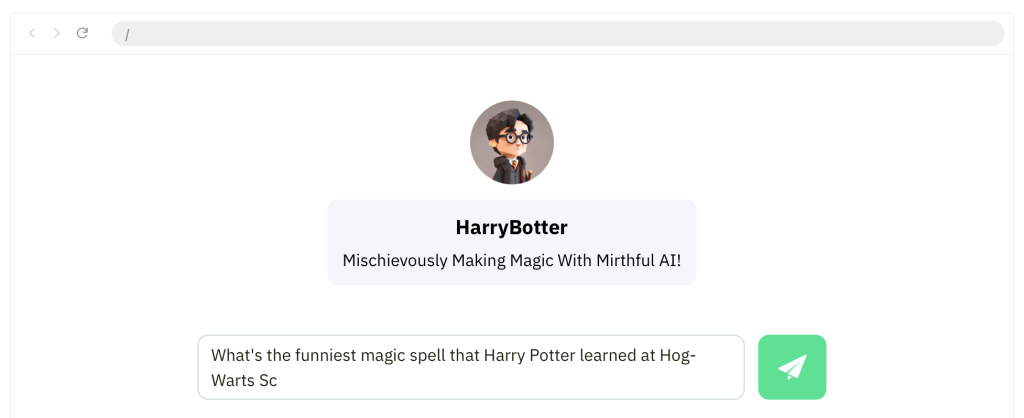
import '@nlux/themes/custom.css';With NLUX, you can optionally define a bot persona and a user persona. Here is an example
Pretty cool right? So if you’re looking to add an AI assistant or chatbot to your app, look no further than NLUX. Its simplicity, customizability, and focus on performance makes it the perfect choice.
 Kenrick Vaz