Winning Faith

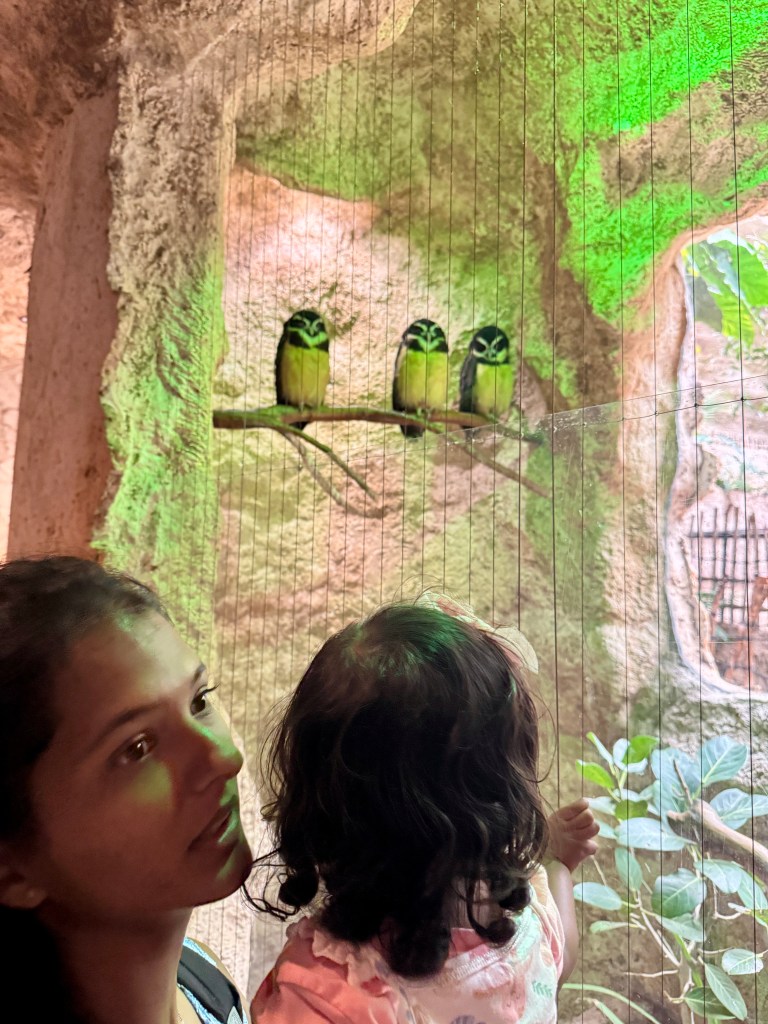
Photo, Poem by Fr. Terry Q

Amidst the rough and rubble
discard and garbage heap
they stand firm base and stature tall
with promises to keep
no matter what surrounds may be
they know they have a place
so grow and bloom
they must and will
whatever circs they face
papaya bougainvillea tall
with fruit and spread of bloom
as woodpile grass and garbage pile
concede for them make room

we find ourselves oft circumstance
denied of full control
surrounded by unsettling waves
disturbances untold despair the chances to survive
we question all the cost
we don’t believe we’ll come out live
despairingly we’re lost

but then a ray of beaming sun
through smog and smoke and fumes
comes piercing through
and loving grace
makes magic life resume
like nature plants and blooming flowers
we resurrect to glow
God’s love forever always there
our winning faith will show

How does SSO work?

We’ve just begun working on an internal portal for a client. One of the things our dev team has to work on is integrating SSO for authentication. Single sign-on (SSO) is a user authentication tool that enables users to securely access multiple applications and services using just one set of credentials.

Instead of twelve passwords in a day, SSO securely ensures you only need one.

Single sign-on puts an end to the days of remembering and entering multiple passwords, and it eliminates the frustration of having to reset forgotten passwords. Users can also access a range of platforms and apps without having to log in each time.

How Does an SSO Login Work?

Let’s see how SSO works with an example that we are all familiar with, accessing Gmail and YouTube

Step 1: A user visits Gmail, or any email service. Gmail finds the user is not logged in and so redirects them to the SSO authentication server, which also finds the user is not logged in. As a result, the user is redirected to the SSO login page, where they enter their login credentials.

Steps 2-3: The SSO authentication server validates the credentials, creates the global session for the user, and creates a token.

Steps 4-7: Gmail validates the token in the SSO authentication server. The authentication server registers the Gmail system, and returns “valid.” Gmail returns the protected resource to the user.

Step 8: From Gmail, the user navigates to another Google-owned website, for example, YouTube. 

Steps 9-10: YouTube finds the user is not logged in, and then requests authentication. The SSO authentication server finds the user is already logged in and returns the token.

Step 11-14: YouTube validates the token in the SSO authentication server. The authentication server registers the YouTube system, and returns “valid.” YouTube returns the protected resource to the user.

The process is complete!

Here is a short video from one of my favorite tech blogs that helps illustrate SSO.

What Is Single Sign-On (SSO)? How It Works. | Video: ByteByteGo


One of the key issues with SSO is that it has a lot of security implications if user credentials are compromised. IT teams use security concepts like the principle of least privilege and role-based access to ensure no user receives more permissions than they need or extensive access to apps they don’t use. Alternatively, if a user’s account is locked out for one reason or another, they will be unable to access all systems or applications that use the SSO account.

The use of multi-factor authentication (MFA) with SSO is a must. MFA provides an added layer of authentication that makes it more difficult for a malicious individual to successfully login to SSO services using stolen credentials. This significantly reduces the risk of an unauthorized user gaining access to multiple services or applications using a single account. 

In conclusion, Single Sign-On (SSO) has revolutionized the way users authenticate and access multiple applications, providing a seamless experience, improved security, and enhanced productivity. As technology continues to evolve, SSO will likely remain a vital component in modern authentication and access management systems, facilitating efficient and secure user journeys in a connected digital landscape.

Optimising Frontend Bundle Size

In today’s digital landscape, where web applications are becoming increasingly complex, optimizing frontend bundle size has become crucial. JavaScript frameworks play a pivotal role in building dynamic and interactive user experiences, but they often result in bulky bundles that can adversely impact website performance. 

The bigger the project size, the longer it takes to download the resources necessary for displaying it in a browser—and users who experience slow-loading pages are less likely to return! Additionally, having a reasonable project size is especially critical if you’re browsing via mobile device, or if there are network problems.

So, an uncontrolled increase in bundle size can quickly become a problem. There are a ton of hacks and ways to make bundle sizes smaller, like tree shaking, lazy loading, or removing unused dependencies. We will explore various strategies and best practices for optimizing frontend bundle size specifically tailored to JavaScript frameworks. By implementing these techniques, developers can enhance website speed, reduce bandwidth consumption, and provide a smoother user experience.

Use smaller libraries

We highly recommend paying attention to the sizes of the packages you install and make note of how the overall bundle size increases when doing so.

Thankfully, to make this task easier, we can use Size Limit, a performance budget tool that shows how the bundle size of a project will be affected after adding a library. It can even calculate the time it would take a browser to download and execute the code.

We can also ensure small bundle sizes by giving library size its proper consideration as we choose a package from one of several analogs. There’s a handy tool which makes this really easy: Bundlephobia it checks the size of an npm package and analyzes its impact on application performance. Beyond merely showing the size of a particular library, it also has other valuable development information, such as showing the size effect of dependencies on the composition of the library, as well as its download time from npm.

Another cool tool is Moiva who’s main goal was to provide developers with a good tool to evaluate and compare npm packages in different dimensions – Popularity, Maintenance, Security, etc.


Use optimized images

Pictures and icons make up a significant percentage of a site’s total resources, so smaller image sizes can greatly impact a project’s overall size. 

Here comes Squoosh to the rescue. It’s a really handy web app that compresses and reduces image sizes. And super helpfully, it also instantly shows the images post-compression, so you can immediately see the balance of performance/image quality. Plus, with Squoosh, you can work with all modern image formats and perform image format conversion.

It’s very important to keep size in mind, and it’s also important to use appropriate image formats; new formats like WebP and AVIF perform better than older formats like PNG.


Are there any other tools/tips/steps you use for optimising your frontend bundle size? Let me know in the comments below

Our Lady of Perpetual Help

Our Lady of Perpetual Help (also known as Our Lady of Perpetual Succour) is a Roman Catholic title of the Blessed Virgin Mary as represented in a celebrated 15th-century Byzantine icon also associated with the same Marian apparition.

The icon has been in Rome since 1499, and is permanently enshrined in the church of Sant’ Alfonso di Liguori, where the official Novena to Our Mother of Perpetual Help text is prayed weekly. In the Eastern Orthodox Church, this artistic iconography is known as the Virgin of the Passion or Theotokos of the Passion due to the instruments of the Passion present on the image.

On 23 June 1867, the image was granted a Canonical Coronation and its official recognition of the Marian icon under its present title. The Redemptorist priests are the only religious order currently entrusted by the Holy See to protect and propagate a Marian religious work of art.

The feast day of Our Mother of Perpetual Help is celebrated on June 27, with novena devotions held every Wednesday. Under Pope Pius XII’s Pontificate, our Mother of Perpetual Help was designated as the national Patroness of the Republic of Haiti and Almoradi, Spain.

What is the symbolism of the icon?

  1. Greek initial for Mother of God.
  2. Greek initial for St. Michael, the archangel.
  3. Greek initial for St. Gabriel, the archangel.
  4. Mary’s mouth is small for silent recollection. She speaks little.
  5. Mary’s eyes are larger, for in all our troubles, they are turned towards us always.
  6. Star on our Lady’s veil means she is the star of the sea who brought the light Jesus into this world.
  7. Red tunic is the color worn by virgins at the time of Christ (AD33).
  8. Christ’s hands turned palms down into his mother’s indicate that the grace of redemption is in her keeping.
  9. Mary’s left hand supports Christ possessively. That means she is his mother. It’s a comforting hand for everyone who calls on her.
  10. Dark blue mantle – the color worn by mothers in Palestine. means Mary is both virgin and mother of Christ.
  11. The entire background is gold representing the heaven.
  12. Golden crown placed on the original picture as a token of many miracles wrought by our lady invoked under the title of perpetual help.
  13. Greek initials for Jesus Christ.
  14. Foot with falling sandal represents Christ’s divine nature, barely clinging to earth. The human nature is symbolized in the other foot to which the sandal is more firmly bound. This simply means that Christ has two natures, Human and Divine. 

The devotion to Our Lady of Perpetual Help has grown steadily over the centuries, as more and more individuals turn to her in times of need. Her image serves as a reminder that even in the face of adversity, we are not alone. She reminds us that there is always someone ready to assist us, offering solace and guidance along life’s journey.

Our Lady of Perpetual Help holds a special place in the hearts of many believers, providing solace, guidance, and intercession. Her image serves as a constant reminder of the enduring power of faith, compassion, and love in our lives. Whether it is in times of joy or sorrow, her presence offers comfort and hope to those who seek her assistance. The devotion to Our Lady of Perpetual Help continues to flourish, as people find solace and inspiration in her unwavering care and maternal love.

The World of Fonts and Typography

In the vast digital landscape, developers are the architects and builders who shape the online world we inhabit. Their expertise is crucial in creating functional, visually appealing, and user-friendly websites and applications. While developers traditionally focus on code, algorithms, and functionality, a critical aspect often overlooked is the impact of fonts and typography on the overall user experience.

Fonts and typography play a vital role in shaping how information is perceived, consumed, and understood by users. Just as the choice of words can evoke different emotions, the right font selection and typographic treatment can significantly enhance the visual appeal and legibility of digital content. Consequently, developers who understand the nuances of fonts and typography possess a powerful toolset to create compelling digital experiences.

Typeface vs. font

The actual printing blocks used by original typesetters belong to a font. The style of the text, however, is generally thought of as the typeface (or just “face”). If you want to get OO about it, a font is the instance of a typeface.

So for example, in this diagram below, “Roboto” is the typeface, whereas “Roboto bold” is a particular font:

Face vs Font

Sometimes a typeface is called a font family.

The individual characters are known as glyphs. For example, the character “a” may be represented by two different glyphs:

Glyph

So a modern font maps Unicode character IDs to their glyphs. Hence a font includes a database of glyphs.

Leading and Kerning

Leading (pronounced like the element “lead” because it comes from the strips of lead used by those original compositors between each row; you can just about make them out in that picture below) is the distance between two lines of text, baseline to baseline. Presentation systems will often refer to this as “Line Height”. Tweaking this can make your long text fit in their boxes, or make the text look quite wrong. Worse, until you see lines with enough clashing ascenders and descenders, you might mistakenly think it is ok.

The term tracking is used to describe the process of proportionally spacing out all the letters in a word:

Example of Tracking

But kerning is the letter spacing between certain pairs of letters that the human eye just likes. Again, these qualities were discovered by the first typesetters on their hot metal presses.

Example of Kerning

These differences are important yet unpredictable. The reason they matter to engineers is that occasionally, we like to use non-proportional fonts (like Courier) in order to get a terminal-like look, with fixed spacing that might be convenient, yet we forget that the resulting text may be unreadable.

Note that this is different from justification, which uses space between words to stretch a line so that it fits flush against one or both margins:

Mostly we read text aligned left with a ragged edge, although newspaper columns can still be fully justified. Justification can give a cleaner, more formal look overall, even if the space interruption looks odd. Typesetters can also put space between the letters in words (hence the need for tracking) to enhance the effect.

Serif vs. Sans Serif

A serif is a decorative line or taper added to the beginning and/or end of a letter’s stem, which creates small horizontal and vertical planes within a word. That is “feet” or “tails”

And my high school French is good enough to work out that “sans serif” means without these tails. (sans = without in French!)

Serif vs. Sans serif

Now from a design point of view, serif fonts look “old and established” whereas sans-serif fonts look “modern”. So authoritative newspapers like to keep to serif fonts (Times refers to both a font and a newspaper) whereas most websites like the space left between sans-serif faces such as Arial or the original Helvetica.


By delving into the world of fonts and typography, developers can collaborate effectively with designers, enabling them to bring their creative vision to life while ensuring optimal functionality and user experience. The ability to choose appropriate fonts, adjust typographic elements, and implement best practices empowers developers to create visually appealing interfaces that engage and captivate users.

Small Gestures, Big Impact

What makes your day beautiful? What do you think about when you go to bed at night? Do you smile looking back at something that happened during the day? It might be a small thing, and that’s where the beauty lies.

Every day we get dozens of chances to demonstrate style and class one small gesture at a time—from being friendly at work, to yielding for another car in traffic, to showing gratitude to someone who helped us. A kind look can brighten someone’s day. A hug can bring warmth and strength. It’s these little things that help people feel loved and happy—that empower them to change, to move on, to believe. They’re the things that get noticed, that make a difference, that matter most.

The smallest act of kindness is worth more than the grandest intention.

Oscar Wilde

When there are days when nothing seems right and everything seems messy. The work, the relationships, the mind — everything seems difficult and hard. On these days, you need to bring in the things that would require no effort to give you some strength to go through these days.

The magic of starting to focus on these little things is that you will gradually shift your thoughts from what is missing in your life to what is there. It will create a little positive loop in your brain feeding you with motivation and energy. You will start to create your own happiness bit by bit. And you can then make a difference to your near and dear ones when they are in similar situations.

If you want others to be happy, practice compassion.  If you want to be happy, practice compassion.

Dalai Lama

Small gestures—whether signage or speech, body language or handwritten messages—can send big signals about who we are, what we care about, and why we do what we do. Even (maybe especially) in this age of digital disruption and creative destruction, never underestimate the power of a small gesture. Don’t let technology overwhelm your humanity.

So go ahead. Write a note. Answer that email. Look someone in the eye. Call that person back. Lend a hand, an ear, a shoulder. Be a big fan of little gestures, and others will be a big fan of yours.


Here’s a lovely story that touched me a few years back

Once upon a time, a person was migrating to a new town and was unsure if he would enjoy it, so he went to a zen master and asked: “Do you believe I’ll be able to love it in this hamlet? Is everyone friendly?”

The master responded with a question. “How did the folks in the town where you grew up treat you?” “They were obnoxious and selfish, enraged, and lived for deception and theft,” said the man. “Those are exactly the types of folks we have in this village,” the master explained.

Another visitor to the community asked the same question a day later, to which the master replied, “How were the people in the town where you came from?”

The visitor replied, “They were kind and lived in harmony, and they looked out for each other. For the land, they respected one another and were seekers of spirit.” “Well, that’s exactly the type of folks we’ve had in this community,” the master explained.

Moral of the Story

Whatever you see in the world, the world sees in you. If you only see the nasty and selfish side of people, that is what they will see in you. So be nice to the world, and the world will be good to you. If you treat the planet well, the world will treat you well.

Figma’s Dev Mode: Bringing Designers & Developers Together

Figma’s Config conference is on at California and there have been some pretty cool and much needed announcements! According to the company, the mission of this year’s Config is to bridge the gap between design and development. 

During the opening keynote, Figma announced a bunch of new tools and features, all geared towards its mission of “making design accessible to all”. Chief among them is a brand new developer mode, intended to finally bridge the gap between designers and developers. I was very surprised to hear that one third of Figma users identify as a developer, but the experience has until now been tailored for designers.

Dev Mode is a new space in Figma that makes it faster and easier to move from design to development. Designers can tag a project ’Ready for Dev‘, and developers can get the information they need and eliminating the need for version updates and extra communication. While the Figma canvas is great for freeform design exploration, it can be confusing if you’re dropped into a design file that’s missing information needed for implementation. Dev Mode is like a browser inspector for your design file, and it brings design concepts—pixels, layers, and groups—closer to developer concepts like code, icons, and tokens.

One of the features that I absolutely love is the ability to compare versions of the screen/asset. Checkout the Dev Mode teaser below


Variables

Variables is Figma’s own take on design tokens, one of the most long-requested features. Figma is introducing variables to enable teams to streamline the process of creating and maintaining multiple brands, devices, and themes. Variables make design testing, iteration, and validation more efficient so designers can shave hours off their workflow. Figma is the only tool with both theming and support for design tokens (single sources of truth that designers and developers can reference to consistently apply UI elements like colour, sizing, and more).


Here is a more detailed walkthrough of Dev Mode, Variables:

Ultimately, Figma’s development mode and variables represent a step forward in creating a more efficient, collaborative, and enjoyable workflow for both developers and designers. The seamless integration of design and development allows for a smoother handoff, reduces errors, and enhances productivity. By leveraging these features, we can dedicate more time to innovation, problem-solving, and pushing the boundaries of design and development.

I can’t wait to work closely with our Design Studio on these new features! The future of collaboration between developers and designers is brighter than ever before. :)

Your Mindset Can Make Or Break You

The human mind possesses an incredible power, capable of shaping the course of our lives. It is not the external circumstances that determine our success or failure, but rather the mindset we adopt in the face of challenges. A positive and determined mindset can propel us to great heights, while a negative and defeatist mindset can hold us back and hinder our progress.

A mindset is the lens through which we interpret and respond to the world around us. It is the collection of beliefs, attitudes, and thoughts that shape our perception of ourselves and our capabilities. Our mindset influences our actions, decisions, and ultimately, our outcomes.

When faced with obstacles and setbacks, those with a growth mindset see them as opportunities for growth and learning. They embrace challenges, view failures as stepping stones to success, and persist in the face of adversity. Their mindset is one of resilience and determination, enabling them to overcome obstacles and reach their goals.

On the other hand, individuals with a fixed mindset perceive challenges as threats to their abilities and self-worth. They fear failure, avoid taking risks, and quickly give up when faced with difficulties. Their mindset is one of limitation, constraining their potential and hindering their progress.

To harness the power of mindset, we must cultivate self-awareness and consciously choose empowering beliefs. We can challenge negative thoughts, reframe setbacks as learning experiences, and surround ourselves with positive influences. By adopting a growth mindset, we open ourselves up to a world of possibilities, constantly seeking improvement and embracing the journey of personal development.

In conclusion, our mindset is a powerful force that can make or break us. It shapes our thoughts, actions, and outcomes, influencing our success and happiness. By cultivating a positive and growth-oriented mindset, we unlock our potential, overcome obstacles, and create a life filled with fulfillment and achievement. Remember, your mindset is the key to unlocking your true potential.

I thought I’d ask ChatGPT to write a poem on this topic and here is what it gave me! :)

In the realm of achievement, the power of the mind is profound,
For within its realms, possibilities and limitations are found.
A mindset, a perspective, a lens through which we view,
Has the potential to shape our destiny, whether false or true.

When faced with trials and challenges that test our strength,
It is our mindset that determines how far we will go, the length.
A mindset of resilience, of determination and belief,
Can conquer any obstacle, bring forth triumphs, and relief.

But a mindset plagued by doubt, by fear and self-doubt,
Can paralyze us, hold us back, and leave us without.
It traps us in a prison of our own creation,
Where potential remains dormant, an unfulfilled sensation.

For it is not the circumstances that solely dictate our fate,
But the way we perceive and respond, whether early or late.
A growth mindset, one of learning and adaptability,
Opens doors, fuels progress, and enhances our ability.

Embrace challenges as opportunities, not as threats,
A mindset of possibility, where success begets.
See failure as a stepping stone, a lesson to be learned,
A mindset of resilience, where bridges can be earned.

Believe in yourself, in your talents and your worth,
A mindset of self-confidence, your true potential’s birth.
Surround yourself with positivity and inspiration,
A mindset of abundance, fueling your aspirations.

So, remember, dear friend, the power that lies within,
Your mindset can make or break you, a truth that’s never been,
Choose wisely how you perceive, how you think and believe,
For your mindset shapes your reality, the life you can achieve.

The Three C’s in the Life of Steve Jobs: Choice, Chance, and Change

Life is an unpredictable journey filled with opportunities, obstacles, and moments that shape our existence. Within this intricate tapestry of existence, there are three powerful forces that often intertwine to define our experiences: choice, chance, and change. These three C’s hold the key to understanding the essence of life itself.

The life of Steve Jobs, the co-founder of Apple Inc., serves as a compelling testament to the power of choice, chance, and change. From his humble beginnings to revolutionizing the technology industry, Jobs exemplified how these three elements can shape the destiny of a person. This essay delves into the remarkable journey of Steve Jobs, highlighting his pivotal choices, chance encounters, and transformative changes that propelled him to become a legendary figure.

Choice
In his early years, Steve Jobs faced a crucial choice that would set the trajectory for his life. He decided to drop out of college, a decision that defied societal expectations. Instead, he followed his passion for technology and design, choosing to explore his entrepreneurial spirit. This bold choice laid the foundation for his later achievements, enabling him to fully immerse himself in creating innovative products that would reshape the world.

Chance
A serendipitous event forever altered the course of Jobs’ life. During his time at the Homebrew Computer Club, he had a chance encounter with Steve Wozniak, a fellow technology enthusiast and brilliant engineer. Their shared vision and complementary skill sets formed a profound partnership, leading them to co-found Apple Inc. This chance meeting was a pivotal moment that ignited a revolution in the technology industry.

Change
The hallmark of Steve Jobs’ legacy lies in his unwavering pursuit of change. Despite initial success with Apple, he faced setbacks and even departure from the company he co-founded. However, Jobs embraced these changes as opportunities for growth. His time away from Apple allowed him to explore new ventures and develop a fresh perspective on innovation.

Years later, through a series of transformative changes, Steve Jobs returned to Apple and spearheaded a remarkable resurgence. He introduced groundbreaking products like the iPod, iPhone, and iPad, which transformed entire industries and revolutionized the way we communicate, consume media, and interact with technology. Jobs’ ability to adapt to change, reimagine possibilities, and infuse his creations with a relentless pursuit of excellence solidified his position as one of the greatest visionaries of our time.


The life of Steve Jobs serves as a true embodiment of the three C’s: choice, chance, and change. His daring choices, such as dropping out of college and pursuing his passion, laid the foundation for his groundbreaking achievements. Chance encounters, most notably his meeting with Steve Wozniak, propelled him into co-founding Apple Inc., reshaping the tech industry forever. Furthermore, Jobs’ embrace of change, even during times of adversity, led to transformative shifts that cemented his legacy.

Steve Jobs’ story inspires us to reflect on our own lives and the significance of the three C’s. By recognizing the power of our choices, remaining open to chance encounters, and embracing change as a catalyst for growth, we can unlock our full potential and leave an indelible mark on the world. Steve Jobs reminds us that greatness is attainable when we have the courage to make bold choices, seize opportunities, and adapt to the winds of change.

Stack Overflow Developer 2023 Survey: React Still King

The field of software development is constantly evolving, driven by advancements in technology, emerging programming languages, and shifting industry trends. To gain insights into the current state of the developer community and better understand their preferences, practices, and perspectives, Stack Overflow conducts an annual survey known as the “Stack Overflow Developer Survey.” This comprehensive survey serves as a valuable resource, providing a wealth of data that sheds light on the experiences and opinions of developers worldwide.

In May 2023 over 90,000 developers responded to Stack Overflow’s annual survey about how they learn and level up, which tools they’re using, and which ones they want. Web frameworks usage dropped overall by about 10%, while plans for specific frameworks increased by roughly 15%

Svelte, Next.js and Deno all saw an increase in adoption in 2023, while React, Vue.js and Angular all saw significant decreases in use. Despite the usage hit, React remains the most popular web framework with 40.6% overall reported usage this year.

There were also big drops in frameworks often used for mobile apps, such as React Native, which was down 33%, and Flutter, down 27%.


2023 continues JavaScript’s streak as its eleventh year in a row as the most commonly-used programming language. Python has overtaken SQL as the third most commonly-used language.


Node.js and React.js are the two most common web technologies used by all respondents. jQuery and Express are the next two popular web technologies for all respondents.

Next.js moved from 11th place in 2022 to 6th this year, likely driven by its popularity with those learning to code.


Developers are naturally curious and interested in new technologies. More jQuery users want to use Node.js or React next year rather than jQuery.


You can see more interesting stats across cloud, databases, programming languages here https://survey.stackoverflow.co/2023

The Stack Overflow Developer Survey stands as a powerful resource that provides a comprehensive understanding of the developer community. Through its global reach, diverse range of topics, and valuable insights, the survey benefits individual developers, employers, and the broader technology industry. By shedding light on emerging trends, preferences, and industry benchmarks, the survey empowers developers to make informed decisions, helps employers adapt their strategies, and contributes to the continued growth and advancement of the software development field.