The Art of Speaking Kindly

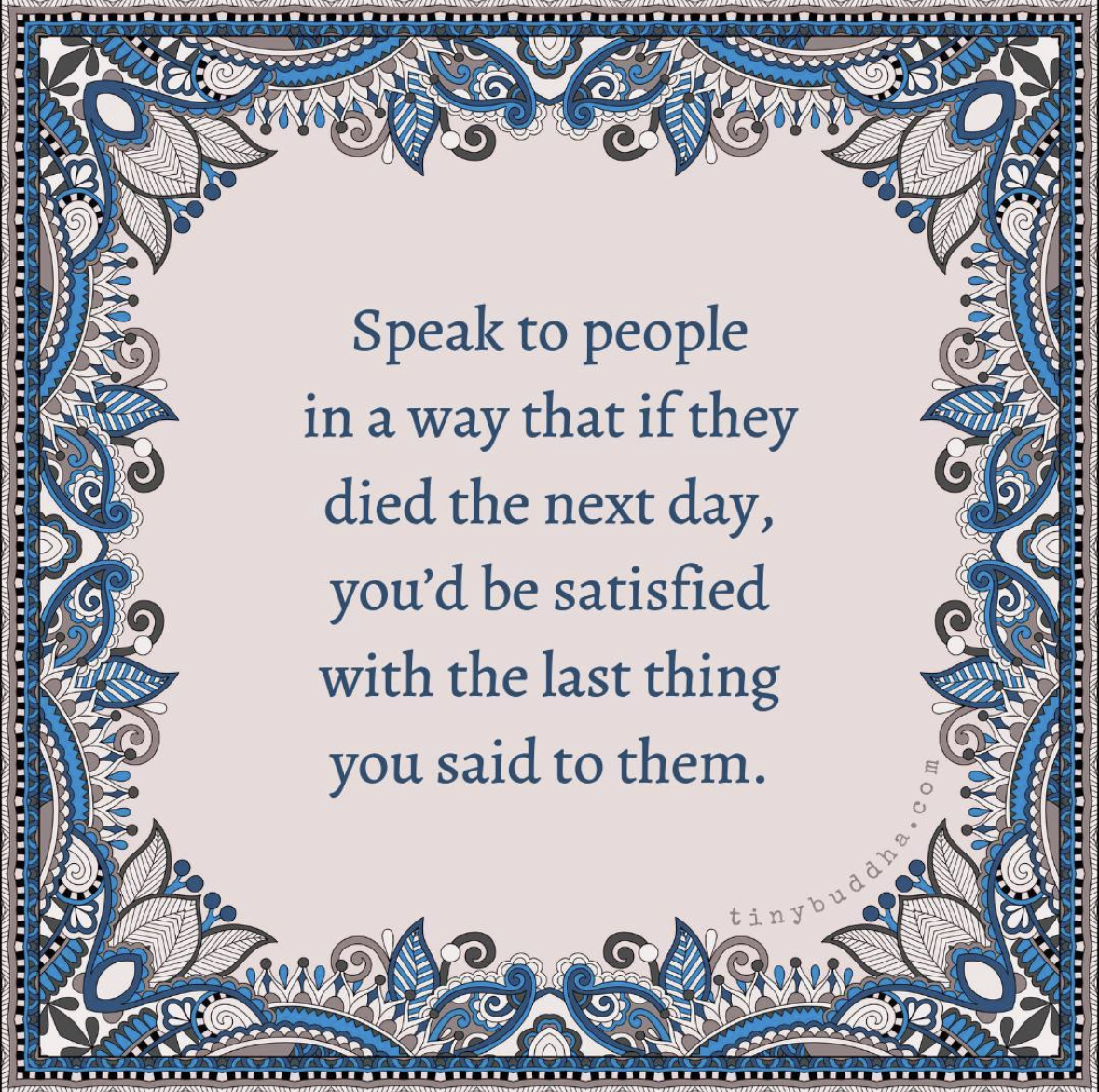
In life, we often take our conversations for granted, assuming there will always be more opportunities to speak to the people around us. But what if we approached every conversation as if it could be the last thing we say to someone? This perspective encourages us to cherish every interaction, to express our thoughts and feelings sincerely, and to make each conversation meaningful and memorable. Speaking to people as if it could be the last time we talk reminds us of the value of connection, love, and the profound impact our words can have on the lives of others. It’s a reminder to communicate with intention, authenticity, and the knowledge that our words might leave a lasting impression.

When I saw this post on Instagram I was reminded of this story shared by a close friend

I arrived at the address and honked the horn. After waiting a few minutes I honked again. Since this was going to be my last ride of my shift I thought about just driving away, but instead I put the car in park and walked up to the door and knocked.. ‘Just a minute’, answered a frail, elderly voice. I could hear something being dragged across the floor.
After a long pause, the door opened. A small woman in her 90’s stood before me. She was wearing a print dress and a pillbox hat with a veil pinned on it, like somebody out of a 1940’s movie.

By her side was a small nylon suitcase. The apartment looked as if no one had lived in it for years. All the furniture was covered with sheets.
There were no clocks on the walls, no knickknacks or utensils on the counters. In the corner was a cardboard
box filled with photos and glassware.
‘Would you carry my bag out to the car?’ she said. I took the suitcase to the cab, then returned to assist the woman.
She took my arm and we walked slowly toward the curb.
She kept thanking me for my kindness. ‘It’s nothing’, I told her.. ‘I just try to treat my passengers the way I would want my mother to be treated.’

‘Oh, you’re such a good boy, she said. When we got in the cab, she gave me an address and then asked, ‘Could you drive
through downtown?’
‘It’s not the shortest way,’ I answered quickly..
‘Oh, I don’t mind,’ she said. ‘I’m in no hurry. I’m on my way to a hospice.
I looked in the rear-view mirror. Her eyes were glistening. ‘I don’t have any family left,’ she continued in a soft voice. ‘The doctor says I don’t have very long.’ I quietly reached over and shut off the meter.

‘What route would you like me to take?’ I asked.
For the next two hours, we drove through the city. She showed me the building where she had once worked as an elevator operator.
We drove through the neighborhood where she and her husband had lived when they were newlyweds She had me pull up in front of a furniture warehouse that had once been a ballroom where she had gone dancing as a girl.

Sometimes she’d ask me to slow in front of a particular building or corner and would sit staring into the darkness, saying nothing.
As the first hint of sun was creasing the horizon, she suddenly said, ‘I’m tired. Let’s go now’.
We drove in silence to the address she had given me. It was a low building, like a small convalescent home, with a driveway that passed under a portico.

Two orderlies came out to the cab as soon as we pulled up. They were solicitous and intent, watching her every move.

They must have been expecting her.
I opened the trunk and took the small suitcase to the door. The woman was already seated in a wheelchair.
‘How much do I owe you?’ She asked, reaching into her purse.
‘Nothing,’ I said
‘You have to make a living,’ she answered.

‘There are other passengers,’ I responded.
Almost without thinking, I bent and gave her a hug. She held onto me tightly.
‘You gave an old woman a little moment of joy,’ she said. ‘Thank you.’

I squeezed her hand, and then walked into the dim morning light.. Behind me, a door shut. It was the sound of the closing of a life..
I didn’t pick up any more passengers that shift. I drove aimlessly lost in thought. For the rest of that day, I could hardly talk. What if that woman had gotten an angry driver or one who was impatient to end his shift? What if I had refused to take the run, or had honked once, then driven away?

On a quick review, I don’t think that I have done anything more important in my life.

We’re conditioned to think that our lives revolve around great moments. But great moments often catch us unaware-beautifully wrapped in what others may consider a small one.


PEOPLE MAY NOT REMEMBER EXACTLY
WHAT YOU DID, OR WHAT YOU SAID

~BUT~
THEY WILL
ALWAYS REMEMBER

HOW YOU MADE THEM FEEL.

Finding Strength in Self-Doubt: The Unseen Admirer

Self-doubt is a common companion on the journey of life. It creeps into our thoughts, casting shadows on our abilities and potential. Yet, within this fog of uncertainty, we often overlook a profound truth: while we may be doubting ourselves, someone else is quietly admiring our strength.

It’s easy to underestimate the power of our own resilience, determination, and courage. We tend to focus on our shortcomings, our mistakes, and our perceived weaknesses. However, these self-imposed doubts blind us to the fact that our actions, choices, and even our vulnerabilities can inspire admiration in others.

Let’s take an example of a student who is struggling through their academic journey. They constantly question their intelligence and their ability to meet the academic demands. However, unbeknownst to them, their classmates watch in awe as they persist through sleepless nights, juggling multiple responsibilities, and seeking help when needed. What the student perceives as weakness, others perceive as tenacity and a refusal to give up.

In the workplace, a professional may find themselves doubting their leadership skills. They may feel overwhelmed by the responsibilities of their role, unsure of their decisions, and apprehensive about leading a team. Yet, their colleagues recognize their dedication, their willingness to learn, and their willingness to accept feedback. They see in this individual a leader who is continuously growing and leading by example, even in the face of self-doubt.

In personal relationships, it’s not uncommon for individuals to question their worthiness of love and companionship. They may carry the weight of past failures or insecurities. Yet, their friends or partners see beyond those doubts. They see someone who is kind, caring, and capable of deep love and empathy.

These examples illustrate the paradox of self-doubt. While we may perceive our own struggles as weaknesses, those around us often perceive them as strengths. They see in us the courage to face adversity head-on, the humility to acknowledge our imperfections, and the perseverance to keep moving forward.

It is important to recognize that the admiration from others is not conditional on our absence of doubt. In fact, it is often our vulnerability and willingness to acknowledge our doubts that make us relatable and inspiring to those around us. It shows them that it is okay to struggle, to question, and to stumble along the way. It teaches them that strength is not the absence of doubt but the ability to push forward despite it.

So, the next time self-doubt casts its shadow over your aspirations, remember that you are not alone in your journey. Someone, somewhere, is silently admiring your strength. Your doubts do not define you; rather, it is your determination to press on, to learn, and to grow that leaves an indelible mark on those who witness your journey. Embrace your doubts as stepping stones, for they are the markers of your path toward greater strength and resilience, both to yourself and to the world around you.

Web Accessibility For Front-End Devs

Website accessibility is the practice of designing and developing websites in a way that ensures they can be easily used and navigated by people with disabilities. This concept can be related to a real-world example by considering how physical spaces are designed to be accessible to individuals with disabilities, such as wheelchair users or those with visual impairments. You’d have a ramp and elevators for wheelchair users and you’d also have Braille signs for the visually impaired.

Accessibility is not just about making things work for screen readers or keyboard navigation – it’s about crafting an experience that resonates with all senses.

Adaptive Web Design in front-end development provides all users equal access to information and services on the website. People shouldn’t be excluded from accessing information because of their disabilities. People with disabilities face challenges when navigating web content that isn’t designed with accessibility in mind. It can lead to confusion, frustration, or abandonment of the website or app.

Let’s take a look at a few best practices for crafting websites that are accessible to all!

Use Semantic HTML: It provides meaning and structure to the content on a webpage, making it easier for assistive technologies and users with disabilities to understand. With over 100 HTML elements, and the ability to create custom elements, there are infinite ways to mark up your content; but some ways—notably semantically—are better than others. Semantic means “relating to meaning”. Writing semantic HTML means using HTML elements to structure your content based on each element’s meaning, not its appearance.

Let’s take an example

<div>
  <span>Three words</span>
  <div>
    <a>one word</a>
    <a>one word</a>
    <a>one word</a>
    <a>one word</a>
  </div>
</div>
<div>
  <div>
    <div>five words</div>
  </div>
  <div>
    <div>three words</div>
    <div>forty-six words</div>
    <div>forty-four words</div>
  </div>
  <div>
    <div>seven words</div>
    <div>sixty-eight words</div>
    <div>forty-four words</div>
  </div>
</div>
<div>
   <span>five words</span>
</div>
<header>
  <h1>Three words</h1>
  <nav>
    <a>one word</a>
    <a>one word</a>
    <a>one word</a>
    <a>one word</a>
  </nav>
</header>
<main>
  <header>
    <h1>five words</h1>
  </header>
  <section>
    <h2>three words</h2>
    <p>forty-six words</p>
    <p>forty-four words</p>
  </section>
  <section>
    <h2>seven words</h2>
    <p>sixty-eight words</p>
    <p>forty-four words</p>
  </section>
</main>
<footer>
  <p>five words</p>
</footer>

Which code block conveyed meaning? Using only the non-semantic elements of <div>and <span>, you really can’t tell what the content in the first code block represents. The second code example, with semantic elements, provides enough context for a non-coder to decipher the purpose and meaning without having ever encountered an HTML tag. It definitely provides enough context for the developer to understand the outline of the page, even if they don’t understand the content, such as content in a foreign language.

In the second code block, we can understand the architecture even without understanding the content because semantic elements provide meaning and structure. You can tell that the first header is the site’s banner, with the <h1> likely to be the site name. The footer is the site footer: the five words may be a copyright statement or business address.

Semantic markup isn’t just about making markup easier for developers to read; it’s mostly about making markup easy for automated tools to decipher. Developer tools demonstrate how semantic elements provide machine-readable structure as well.


Provide Captions and Transcripts for Videos/Audio Content: Captions or transcripts should be added to videos and audio content to make them accessible to users with hearing impairments.

Use Alt Text for Images: Images often convey important information, such as charts, graphs, diagrams, or icons. Alt text provides an opportunity to convey this information to users who can’t view the image.

Use High Color Contrast: High colors contrast is significant because it makes the text easier to read for users with low vision.

Provide Keyboard Navigation: Keyboard navigation allows users to access all website functionalities. This is very helpful and vital for people with motor impairments who can’t use a mouse or other pointing devices.


Testing

Testing websites is a highly crucial step in ensuring that your website or app is accessible to all users, regardless of their physical abilities. Most importantly, testing helps you identify any issues and address them before they become an obstacle for people. You can use a powerful testing tool, axe DevTools, and download its extension to check errors quickly in your browser. Additionally, use keyboard-only navigation and screen readers to test your website or application and make sure all elements and content are accessible using these technologies.

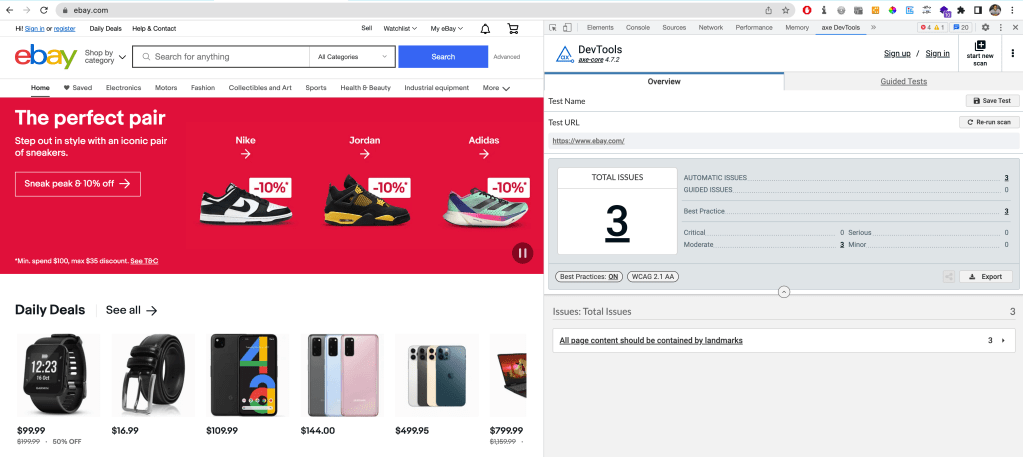
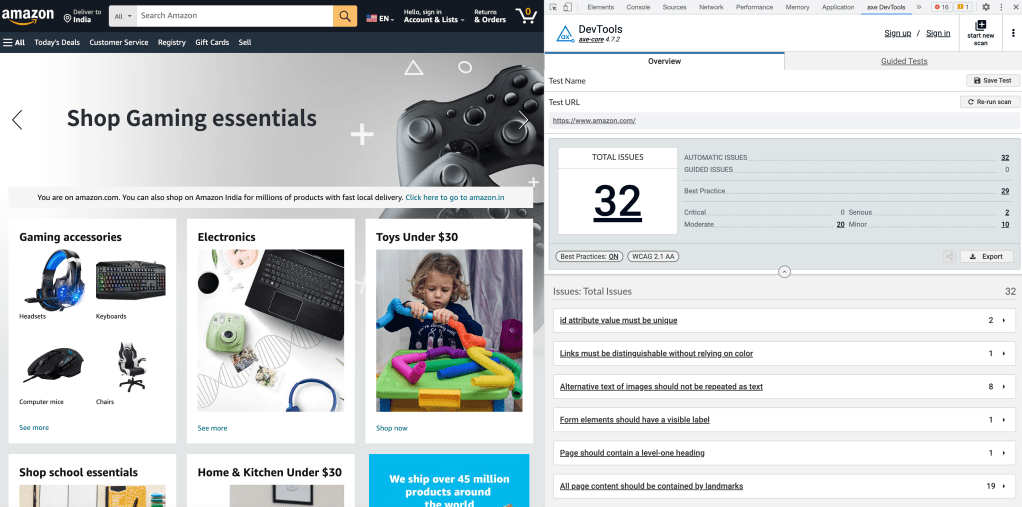
I did a quick check for eBay.com renowned for its high standards when it comes to engineering. Below we see just 3 issues shown on the axe DevTools Chrome extension for eBay as compared to amazon.com

eBay.com
amazon.com

Go ahead and try this extension out on the projects you are working on and I am sure it will help with delivering sites that check all the boxes on accessibility! Let me know in the comments section if you have any more recommendations on accessibility best practices. :)

MARS: Chatbot using Power Virtual Agent

Power Virtual Agents (PVA) has been popping up in conversations for a few months now and I’ve always been meaning to try it out. We have an ongoing proposal for developing a chatbot. And once again PVA was mentioned. This was the perfect time to try it out. I set myself a target of completing this in half a day! I’ll let you know at the end if I managed or no! ;)

First a very brief intro to Power Virtual Agents (PVA). It is a user-friendly, no-code/low-code platform developed by Microsoft that empowers organizations to create and deploy AI-powered chatbots and virtual agents without the need for extensive coding or technical expertise. These virtual agents can be used to automate a wide range of customer service, support, and business processes, enhancing customer engagement and operational efficiency. A few key things before we go ahead

  • PVAs seamlessly integrate with Power Apps, Power Automate, Power BI which allows you to connect your virtual agent to various data sources, automate processes, and gain insights from your chatbot interactions.
  • PVA offers a library of pre-built templates and content, making it easier to get started with common use cases like customer support, appointment scheduling, FAQs, and more.
  • You can deploy your Power Virtual Agent on various channels, including websites, Microsoft Teams, Facebook, Slack, and more. This multi-channel support ensures that your virtual agent can reach customers on their preferred platforms.
  • Power Virtual Agents adheres to industry standards and offers features like authentication, authorization, and data protection to ensure that your chatbot interactions are secure and compliant with relevant regulations.
  • PVA is designed to scale with your organization’s needs. Whether you need a simple FAQ chatbot or a complex virtual agent handling intricate processes, Power Virtual Agents can accommodate your requirements.

The Usecase

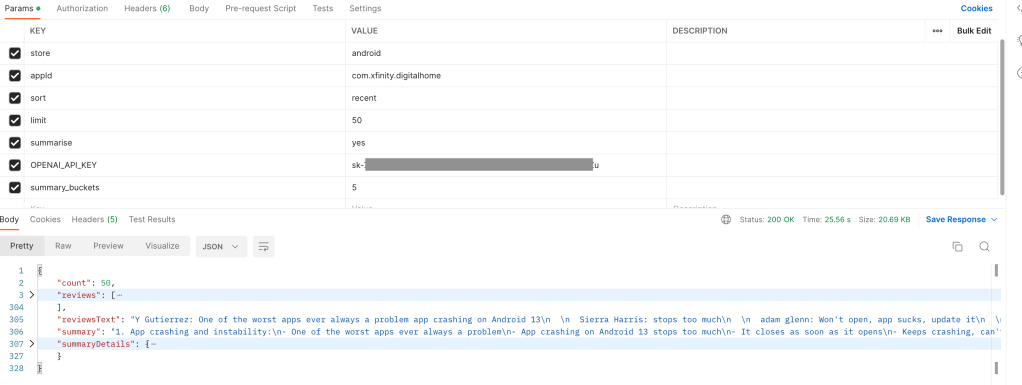
Well what bot do I build? For the last few months our CX Studio has been doing assessments for clients and one piece of the mobile section is summarising the concerns/issues from the feedback on the App Store and Play Store. We’ve been doing this manually, using Chat GPT to summarise the reviews. I finally got down to automating it last week by developing a Lambda which would fetch reviews and summarise it using Open AI services. 

So for my bot I thought why not use this endpoint to make it easy for us to get our mobile app summaries on Teams and that is how MARS was born! MARS is Mobile App Review Summariser (MARS!) :)

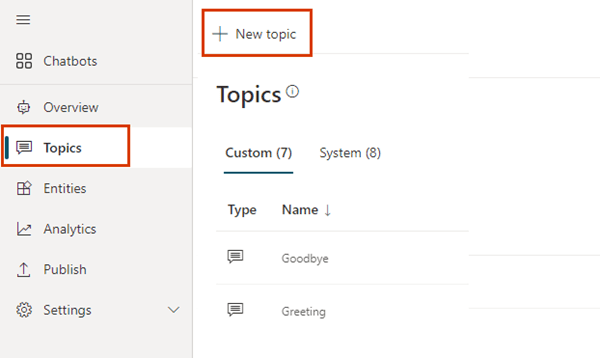
I have developed chatbots on Dialogflow, Azure’s QNA Maker, RASA to name a few and since I heard that the Power platform is very intuitive and designed for non-techies, I decided to explore it on my own without following any tutorial. On signing up, I created my first bot and saw a few pre-filled topics, entities. 

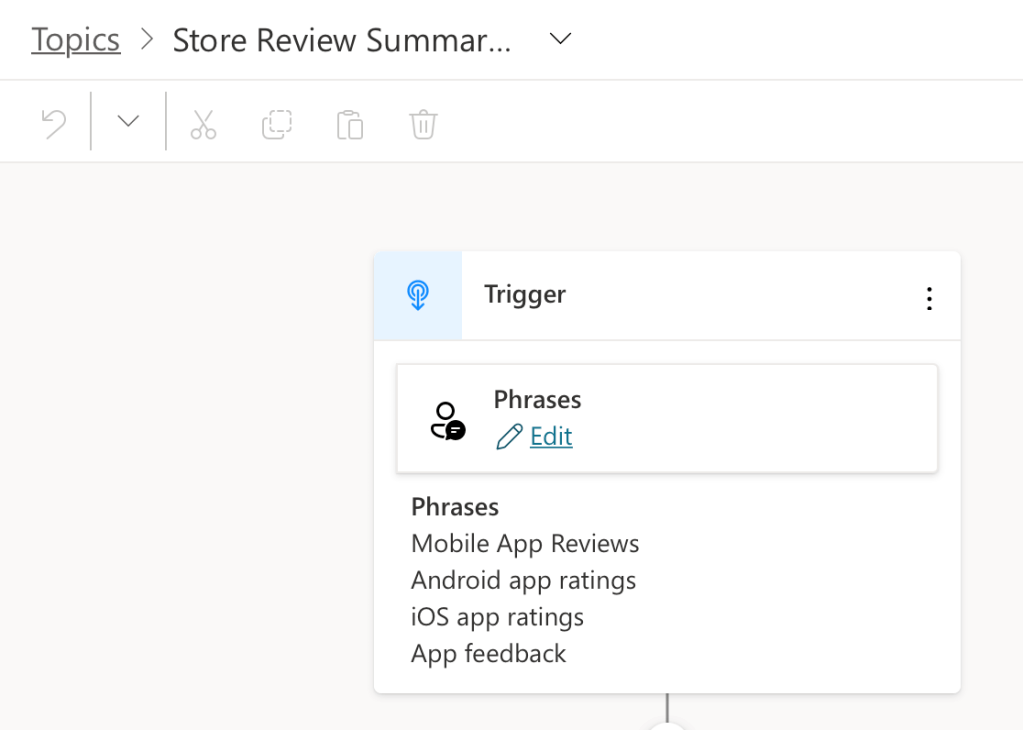
I started off with my new topic, gave it a name and added a few phrases.

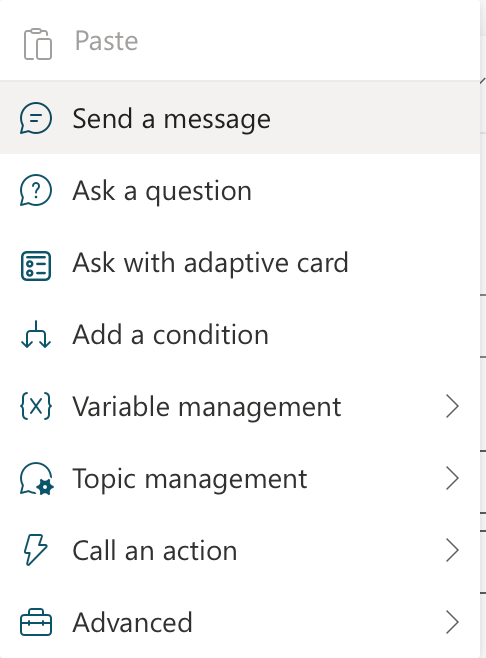
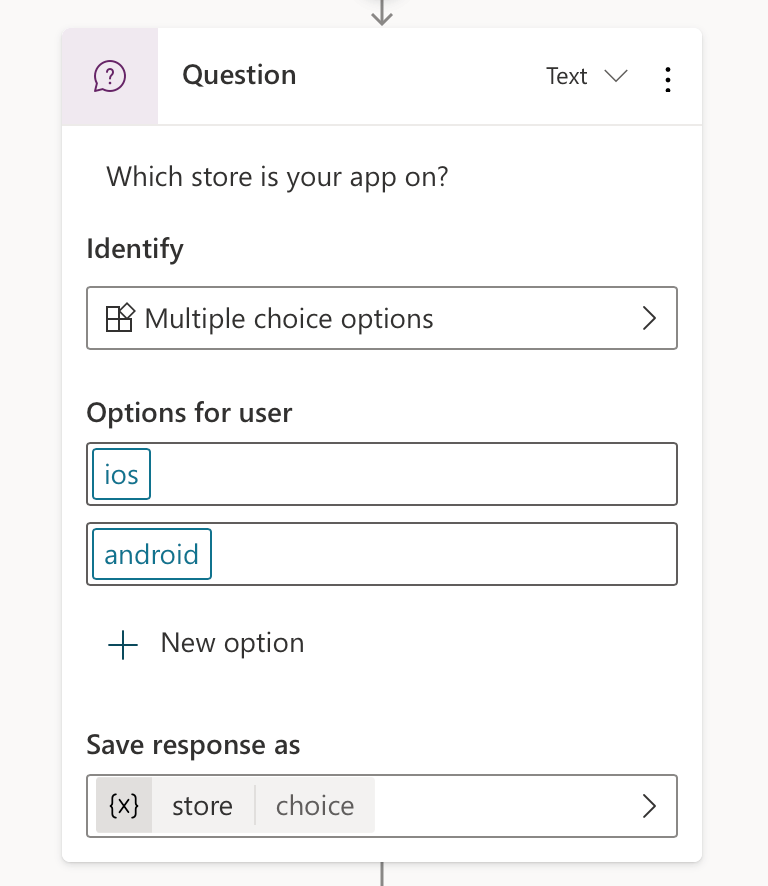
I was quickly able to add a few nodes to collect details I needed. 

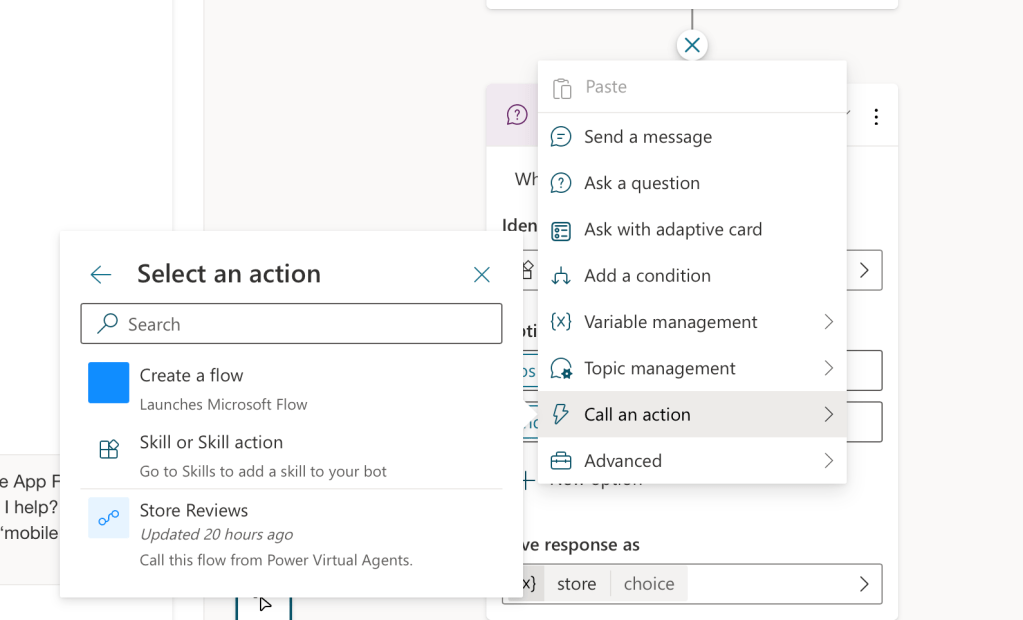
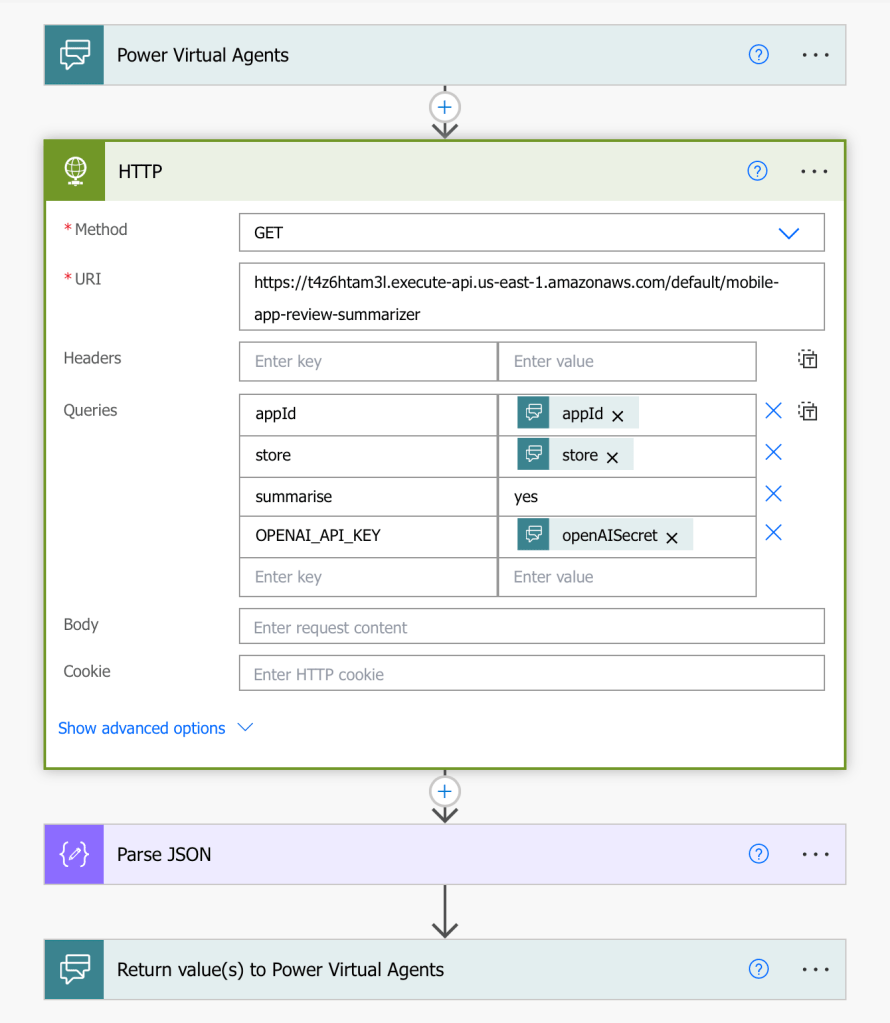
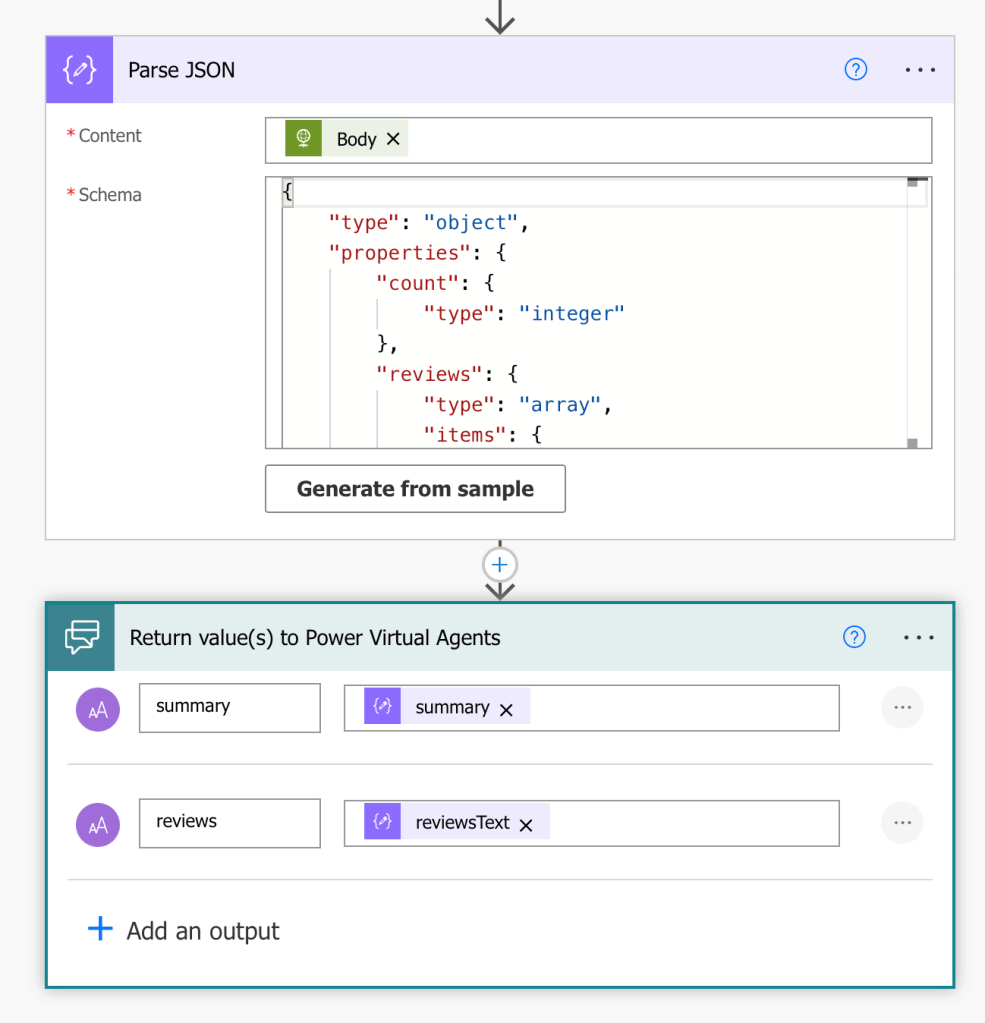
The next interesting bit was calling my API. Here is where PVA has the ability to add flows from Power Automate. This again was a new platform for me. I went ahead and was able to add my Store Reviews flow where I added the HTTP action, parsed my response and returned the two keys my bot needed. Here is where I needed help with parsing the response, had to visit our dear friend StackOverflow for assistance! :)

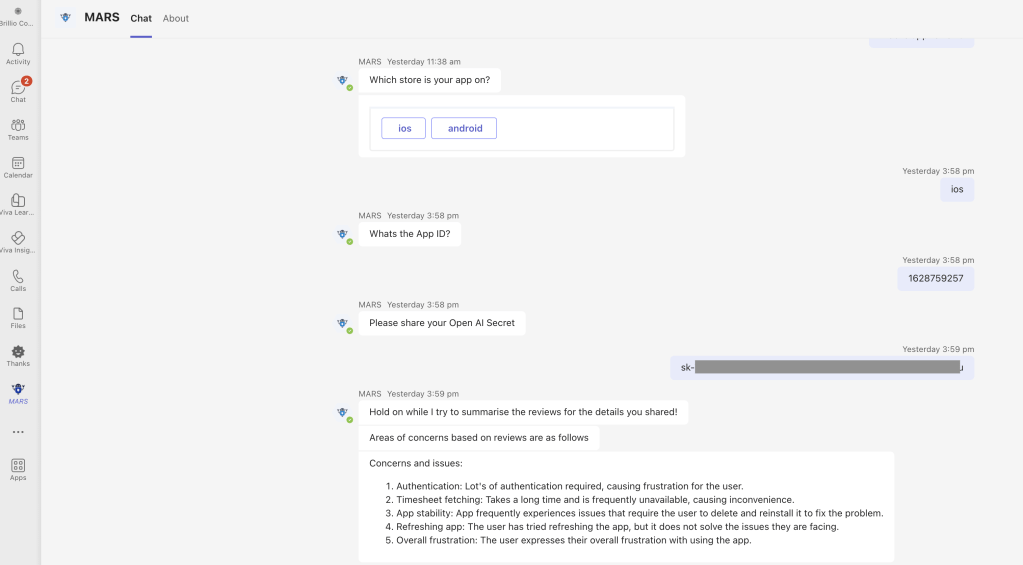
Once I was ready, I published my bot and there were a host of channels which I could configure. Below is a recording of a cool demo site that PVA provides and a screenshot on Teams. The bot is for reviews of our company iOS OnTheGo app on the App Store

Takeaways:

  • The PVA interface is intuitive, it wasn’t too difficult to quickly setup my conversation flow
  • Integrating with Power Automate was the one step that took some time to figure out
  • And yes, I was able to finish this in half a day as planned, but that’s only because I had my API ready! :)

There is still a lot more to explore in terms of security, navigating between topics, handing off flows to live agents and much more. Yes, the bot I developed is very very basic, but our team will definitely be using it and we will be building on this in the coming weeks. 

If you’ve made it so far thank you! Happy to hear your experience with PVA or if you plan to try it out? Let me know in the comments below! :)

CSS Nesting

When we use a CSS preprocessor like Sass or Less, we can nest a CSS style rule within another rule to write clean and understandable code. This nesting rule is now supported in native CSS. Before nesting, every selector needed to be explicitly declared, separately from one another. This leads to repetition, stylesheet bulk and a scattered authoring experience.

.nesting {
  color: green;
}
​
.nesting > .is {
  color: red;
}
​
.nesting > .is > .awesome {
  color: blue;
}

After nesting, selectors can be continued and related style rules to it can be grouped within

.nesting {
  color: green;
​
  > .is {
    color: red;
​
    > .awesome {
      color: blue;
    }
  }
}

Pretty cool right?

Nesting helps developers by reducing the need to repeat selectors while also co-locating style rules for related elements. It can also help styles match the HTML they target. If the .nesting component in the previous example was removed from the project, you could delete the entire group instead of searching files for related selector instances.

Nesting can help with:

  • Organization
  • Reducing file size
  • Refactoring

CSS nesting allows you to define styles for an element within the context of another selector.

.parent {
  color: blue;
​
  .child {
    color: red;
  }
}

In this example, the .child class selector is nested within the .parent class selector. This means that the nested .child selector will only apply to elements that are children of elements with a .parent class.

This example could alternatively be written using the & symbol, to explicitly signify where the parent class should be placed. Nesting classes without & will always result in descendant selectors. Use the & symbol to change that result.

.parent {
  color: blue;
​
  & .child {
    color: red;
  }
}

Nesting @media

It can be very distracting, confusing, maddening to move to a different area of the stylesheet to find media query conditions that modify a selector and its styles. That distraction is gone with the ability to nest the conditions right inside the context.

For syntax convenience, if the nested media query is only modifying the styles for the current selector context, then a minimal syntax can be used.

.card {
  font-size: 1rem;
​
  @media (width >= 1024px) {
    font-size: 1.25rem;
  }
}

All examples up to this point have continued or appended to a previous context. You can completely change or rearrange the context if needed.

The & symbol represents a reference to a selector object (not a string) and can be placed anywhere in a nested selector. It can even be placed multiple times. The example below may not be the best, but I am sure there are certain scenarios where this will be handy!

.card {
  .featured & {
    /* .featured .card */
  }
}
​
.card {
  .featured & & & {
    /* .featured .card .card .card */
  }
}

Now for a few quirks, invalid nesting examples

HTML elements currently require the & symbol in front or being wrapped with :is().

.card {
  h1 {
    /* 🛑 h1 does not start with a symbol */
  }
}
​
.card {
  & h1 {
    /* ✅ now h1 starts with a symbol */
  }
​
  /* or */
​
  :is(h1) {
    /* ✅ now h1 starts with a symbol */
  }
}

Many CSS class naming conventions count on nesting being able to concatenate or append selectors as if they were strings. This does not work in CSS nesting as the selectors are not strings, they’re object references.

.card {
  &--header {
    /* is not equal to ".card--header" */
  }
}

CSS Nesting is only at version 1. Version 2 will introduce more syntactic sugar and potentially fewer rules to memorize. There’s a lot of demand for the parsing of nesting to not be limited as well!

Nesting is a big enhancement to the CSS language. Right?

WWDC 2023: TipKit

It may be a little surprising that Swift did not have a tip framework upto now! WWDC 2023 announced the release of a new iOS framework called TipKit!

So what is TipKit all about? The goal of TipKit is to make it as easy as possible for developers to display short contextual information that highlights or explains a feature of their app.

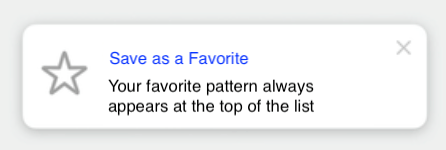
To give you a better idea, here are 3 exemples of how these little UI tooltips look like:

For all of us who have been asked to implement tooltips, I’m sure the announcement of TipKit came with a feeling of relief, because you’ve probably experienced how surprisingly challenging that task can be!

There are mostly two reasons why implementing tooltips without the support of a first-party framework is challenging:

First, displaying the tooltips in a way that works across all the combinations of languages and screen sizes without breaking your UI is not easy.

And then, you also want to make sure that you trigger the tooltips at the right time, so that you don’t overwhelm your users. And the business logic behind this tend to get complex really fast.

As you can guess, the reason why many iOS developers got excited by the announcement of TipKit is because it nicely solves both of these issues So let’s have a look at how it looks like in the code!

This is the simplest implementation of a Tip: you just need to provide a title and a message. If you want, you can also add an image, typically an icon, through the property asset.

struct FavoriteTip: Tip {
    var title: Text {
        Text("Save as a Favorite")
    }
​
    var message: Text {
        Text("Your favorite pattern always appears at the top of the list")
    }
​
    var asset: Image {
        Image(systemName: "star")
    }
}
Output of above code

It’s also possible to display images in the title or the message, because SwiftUI allows you to inline an Image inside a Text!

If needed, you can even configure some actions that your user will be able to trigger:

var actions: [Action] {
  [
    Tip.Action(
      id: "learn-more",
      title: "Learn More"
    )
  ]
}

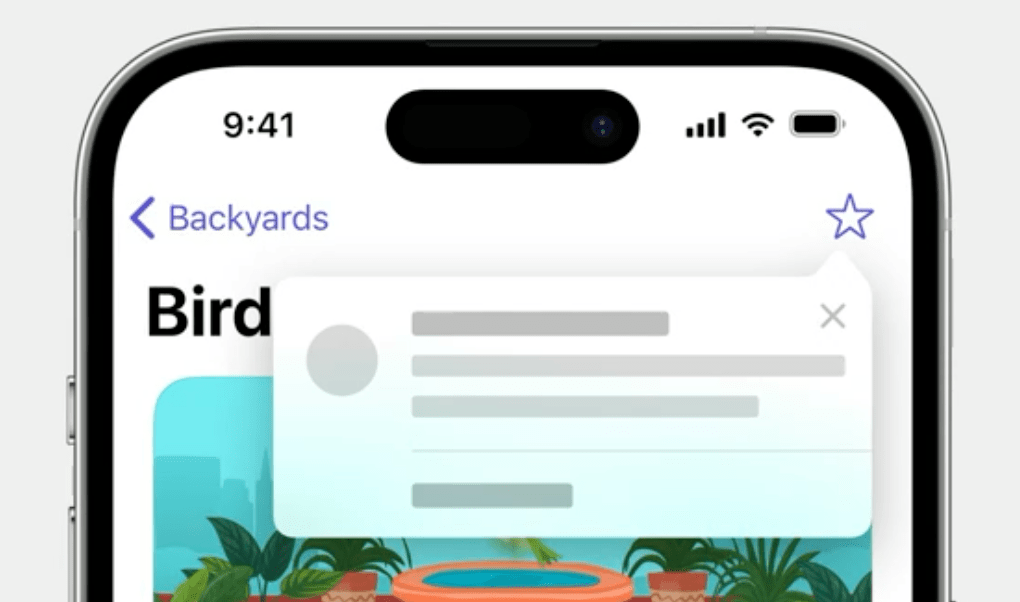
And once your Tip is configured, you can display it either by embedding it inside a TipView and adding this new view to your view hierarchy. But you can also have your Tip be displayed in a popover that points towards one of your UI element:

So we’ve seen how TipKit helps you display tooltips on your UI, now let’s see how it manages the logic of when to show the tips 

First, you have control over the frequency at which tips will be shown to your users:

// One tip per day
TipsCenter.shared.configure {
    DisplayFrequency(.daily)
}
​
// One tip per hour
TipsCenter.shared.configure {
    DisplayFrequency(.hourly)
}
​
// Custom configuration
let fiveDays: TimeInterval = 5 * 24 * 60 * 60
TipsCenter.shared.configure {
    DisplayFrequency(fiveDays)
}
​
// No frequence control. Show all tips as soon as eligible
TipsCenter.shared.configure {
    DisplayFrequency(.immediate)
}

You can also define rules that will govern how each individual Tip will be displayed.

TipKit supports two kind of rules.

First, you have rules that are based on that current state of your app.

This allows you, for instance, to specify that a Tip should be displayed only when your user is already logged in. And then you have rules based on events being triggered. So if your app already implements analytics, it then becomes very easy to reuse your existing analytics events to configure your Tip!

var rules: Predicate<RuleInput...> {
    // User is logged in
    #Rule(Self.$isLoggedIn) { $0 == true }
    
    // User has viewed a pattern at least 3 times
    #Rule(Self.patternDetailView) { $0.count >= 3 }
}

That’s it, I think I have covered the basics as an introduction to TipKit. If you want to go further, you can check out both the WWDC Session “Make features discoverable with TipKit” or the framework’s documentation.

St. Clare of Assisi

Clare of Assisi was born in 1193 as Chiara di Favarone di Offreduccio belonging to one of the most important noble families in Assisi. During her youth, she got extremely fascinated by St Francis. When Chiara was 18 years old, she renounced marriage and a life of wealth and social prestige, fled to the monastery of the Franciscan brothers just outside Assisi in 1212, and became a nun. She became the first female companion of St Francis and lived as ascetically as him. After the death of St Francis, she became the heart of Franciscan spirituality. Clare was so devoted and dedicated to Francis that she was often referred to as “alter Franciscus,” or another Francis. 

Clare of Assisi was the first woman in the history of the church to write a rule of order. A contemplative nun who, for more than thirty years, successfully resisted popes and cardinals in a matter of the heart, yet retained their respect and admiration.

Following Francis’ death, Clare continued to promote her order, fighting off every attempt from each pope trying to impose a rule on her order that would water down their “radical commitment to corporate poverty.”

In 1224, an army of rough soldiers from Frederick II came to attack Assisi. Although very sick, Clare went out to meet them with the Blessed Sacrament on her hands. She had the Blessed Sacrament placed at the wall where the enemies could see it. Then on her knees, she begged God to save the Sisters. Clare is often pictured carrying a monstrance or pyx, to commemorate this time.

Clare died on 11 August 1253. Pope Innocent IV who happened to be staying in his palace at the friars’ monastery in Assisi, officiated the funeral. He knew her very well and was convinced of her sanctity. At Pope Innocent’s request, the canonization process for Clare began immediately, and two years later in 1255, Pope Alexander IV canonized Clare as Saint Clare of Assisi.

St. Clare was designated as the patron saint of television in 1958 by Pope Pius XII, because when St. Clare was very ill, she could not attend mass and was reportedly able to see and hear it on the wall in her room.

She is also the patroness of eye disease, goldsmiths, and laundry.

SwiftUI: ContentUnavailableView

SwiftUI was introduced by Apple at WWDC 2019 as a modern and declarative user interface framework for building apps across all Apple platforms. SwiftUI represented a significant shift in the way developers create user interfaces compared to the traditional UIKit or AppKit frameworks. SwiftUI was designed to make app development faster, easier, and more intuitive by providing a clear and concise syntax for describing UI layouts and behaviors. Swift UI keeps getting better and better with every WWDC!

In iOS 17, SwiftUI got a new view dedicated to presenting an empty state of your app, ContentUnavailableView.

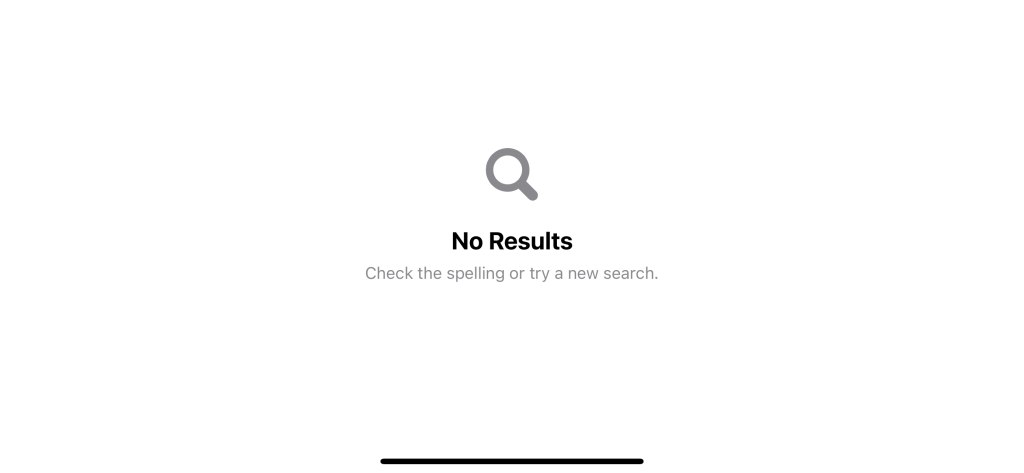
This is what ContentUnavailableView look like out of the box.

When should we use ContentUnavailableView

As you might be able to guess from the name, ContentUnavailableView is meant to use when a view’s content can’t be displayed.

This can happen for many reasons, such as a network error, a list without items, or a search that returns no result.


How to use ContentUnavailableView

There are many ways we can use ContentUnavailableView. I will categorize them into three groups.

  1. Built-in unavailable views
  2. Custom unavailable views
  3. Unavailable views with actions

Built-in unavailable views

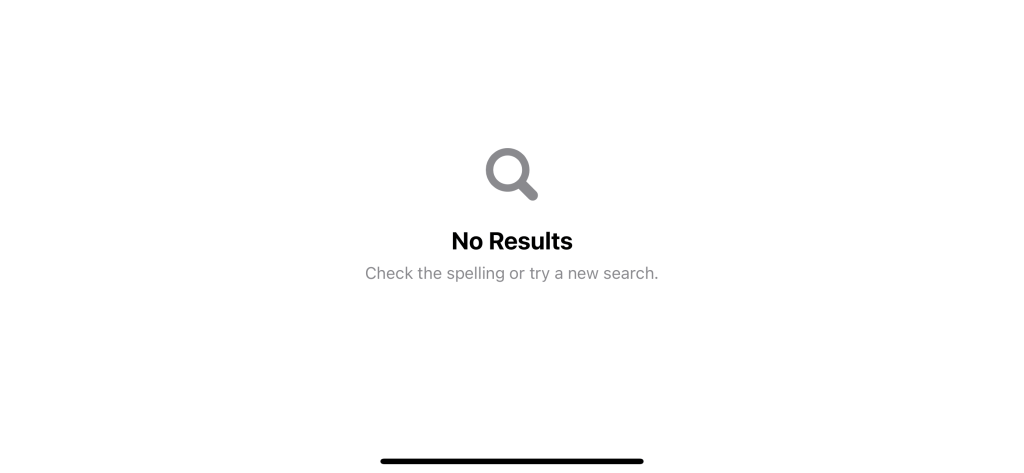
As discussed in the last section, ContentUnavailableView can be used in many circumstances where the view’s content isn’t available. But, a search that yielded no result is the only scenario Apple supported out of the box. In iOS 17, ContentUnavailableView has only one built-in static variable, search.

You can quickly present an unavailable view that conveys an empty search result view using ContentUnavailableView.search.

struct ContentView: View {
    var body: some View {
        ContentUnavailableView.search
    }
}

With a simple line of code, you will get a magnifying glass image, a “No results” label, and a description of how to get a proper search result.

ContentUnavailableView.search

You also have another option to create an empty search view with a provided search query.

struct ContentView: View {
    var body: some View {
        ContentUnavailableView
            .search(text: "Kenrick")
    }
}
An empty search view with a search query

Custom unavailable views

If you want to use ContentUnavailableView for view other than search, you can easily do that with other initializers that accept:

  1. Label
  2. Image
  3. Description

In the following example, we create an empty view for a network error.

ContentUnavailableView(
    "No Internet",
    systemImage: "wifi.exclamationmark",
    description: Text("Try checking the network cables, modem, and router or reconnecting to Wi-Fi.")
)
A custom unavailable view.

Unavailable views with Actions

The last way of creating an unavailable view is the most flexible one.

init(
    @ViewBuilder label: () -> Label,
    @ViewBuilder description: () -> Description = { EmptyView() },
    @ViewBuilder actions: () -> Actions = { EmptyView() }
)

You can inject three @ViewBuilder that populate an unavailable view.

  1. label, which use for the title and image.
  2. description, which use for content.
  3. actions, which you can use to provide extra actions.

As you can see, we got an extra parameter, actions, which you can use to provide an action for your empty view, e.g., action buttons.

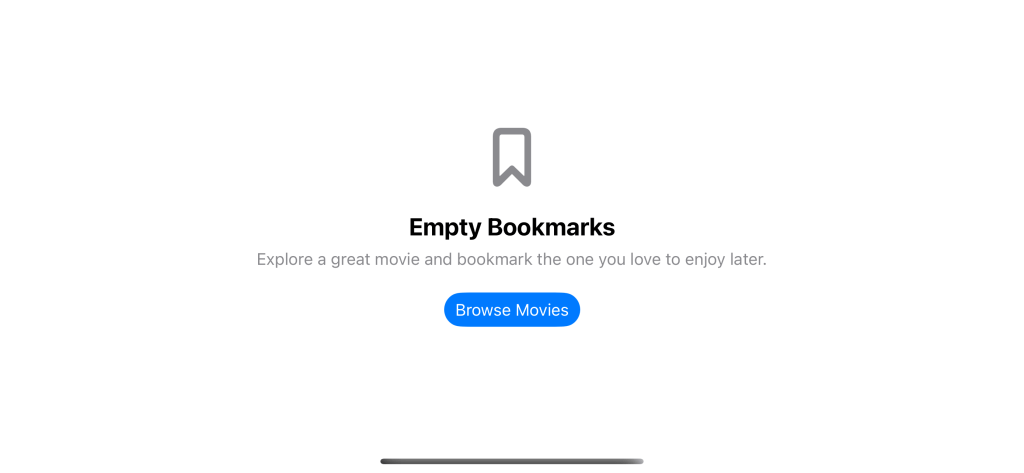
In the following example, we provide an action button that will direct users to another view.

ContentUnavailableView {
    Label("Empty Bookmarks", systemImage: "bookmark")
} description: {
    Text("Explore a great movie and bookmark the one you love to enjoy later.")
} actions: {
    Button("Browse Movies") {
        // Go to the movie list.
    }
    .buttonStyle(.borderedProminent)
}
An unavailable view with a button.

Benefit of ContentUnavailableView

While you can achieve the same thing using VStack and Text, ContentUnavailableView can save you some development time for this boring and repetitive task.

Apart from standard and consistency, ContentUnavailableView also ensures it looks great across platforms.

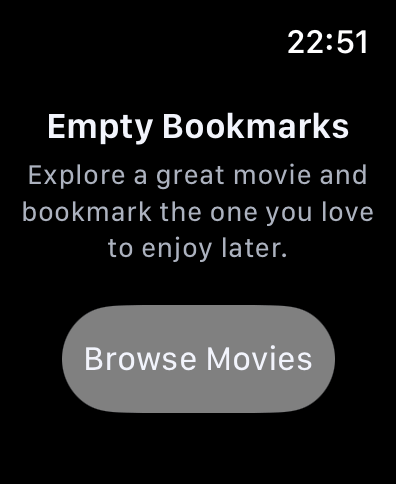
Here is an example of ContentUnavailableView on Apple Watch where ContentUnavailableView will automatically hide an image to save some space.

Apple Watch

Hope this article helped you understanding how we can leverage ContentUnavailableView in SwiftUI! :)

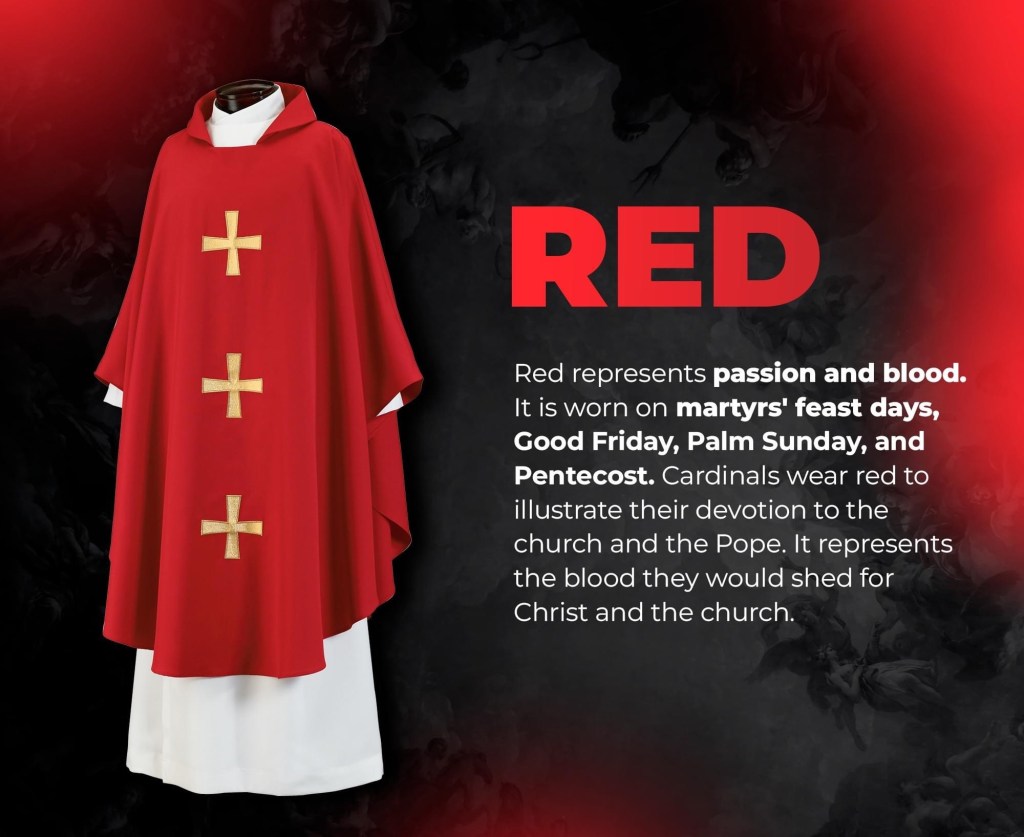
Liturgical Colors

Liturgical colors within Christian liturgy signify different seasons and times of the year. Each season has its own mood, meaning, and type of prayer. Each color has its own meaning and feeling, and can be seen worn or hung throughout the church during specific times of year. They help to visually express the different liturgical seasons and feasts, aiding in the overall experience of worship and reflection. They serve as a visual reminder of the specific themes and moods associated with each season or feast.

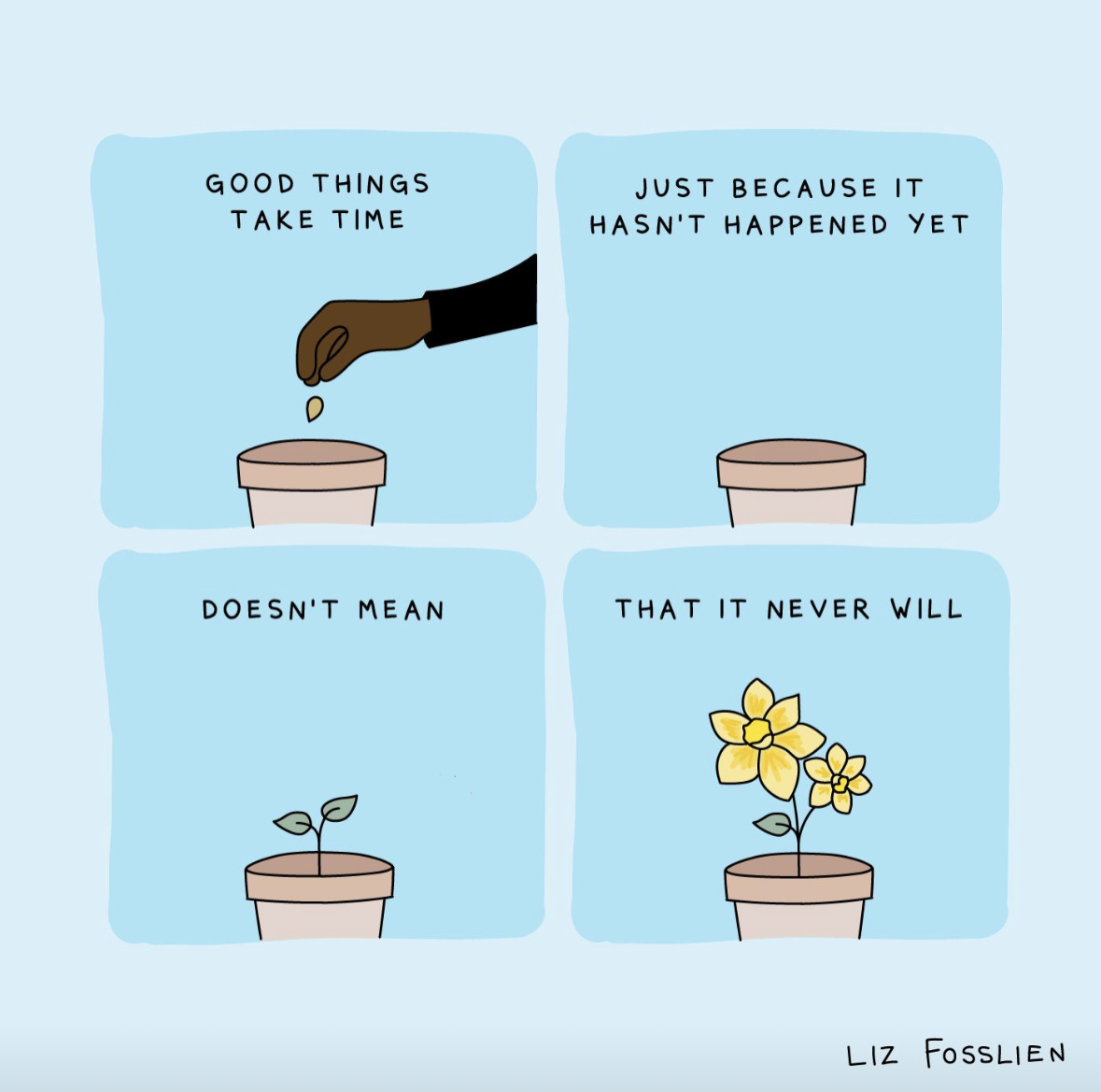
Good Things Take Time

In a fast-paced and instant gratification-driven world, the phrase “good things take time” may sound like a cliché. However, this timeless saying holds profound wisdom and teaches us an invaluable lesson about the nature of success and fulfillment. Whether it’s personal growth, professional achievements, or the pursuit of our dreams, the journey towards greatness demands patience, perseverance, and a steadfast belief in the power of time.

Firstly, the realization that good things take time encourages us to set realistic expectations. Overnight successes are rare and often the result of years of hard work, dedication, and resilience behind the scenes. Understanding this truth allows us to avoid the trap of seeking shortcuts or instant results. Instead, we can focus on building a strong foundation for our aspirations and taking consistent steps towards our goals.

Moreover, the journey of waiting for good things to unfold instills valuable life lessons. Patience teaches us to appreciate the present and savor each moment of the process. It offers an opportunity for self-reflection, growth, and a deeper understanding of ourselves and our desires. Along the way, we learn to embrace challenges and setbacks as stepping stones rather than barriers.

Success built on a solid foundation tends to be sustainable and long-lasting. Just like nurturing a plant from a tiny seed, investing time and effort into our endeavors allows us to cultivate skills, knowledge, and experiences that withstand the test of time. Rushing through the process may yield short-term gains, but they are often superficial and lack depth.

Embracing the principle that good things take time also cultivates resilience and perseverance. It requires us to keep pushing forward, even when faced with adversity or moments of doubt. When we encounter obstacles along the journey, we are reminded that progress is not always linear, and setbacks are a natural part of growth. The ability to stay committed and resilient in the face of challenges is a defining trait of those who achieve remarkable success.

Moreover, the process of waiting and working towards our goals allows us to savor the joy of anticipation. It fuels our passion and commitment, keeping us driven and focused on our aspirations. The anticipation of success can be a powerful motivator, encouraging us to put in the effort and dedication necessary to reach our objectives.

Lastly, good things taking time teaches us to celebrate progress rather than solely focusing on the end result. Each step forward, no matter how small, is a reason for celebration. Recognizing and appreciating the progress we make fuels our motivation and reinforces the belief that we are moving in the right direction.

In a world that often values instant results, embracing the journey and allowing success to unfold organically can be a transformative experience. Through patience, we gain wisdom, resilience, and a deeper appreciation for the process of growth. So, let us remind ourselves that as we work towards our goals and dreams, it is in the journey itself that we find the true essence of success and fulfillment.


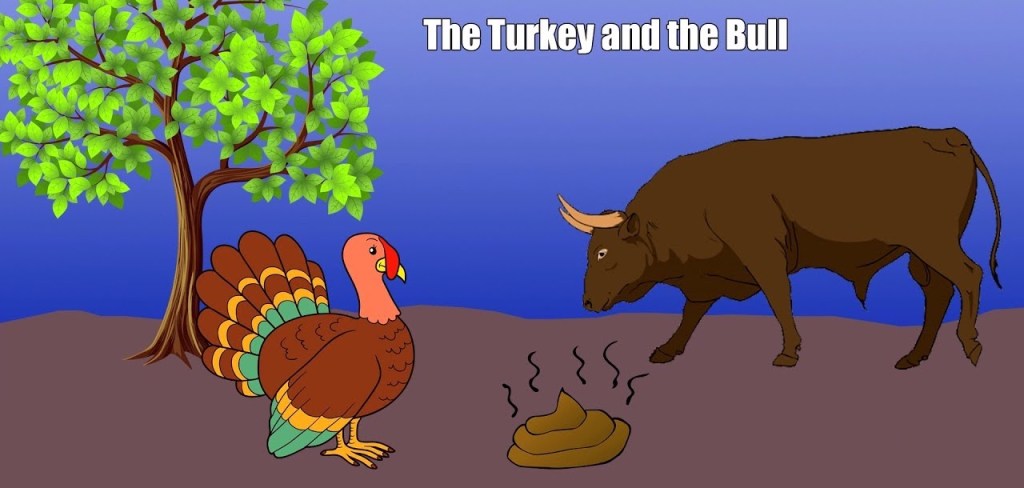
I recall this funny story related to this topic:

A turkey was chatting with a bull. “I would love to be able to get to the top of that tree,” sighed the turkey, “but I haven’t got the energy.”

“Well, why don’t you nibble on some of my droppings?”replied the bull. “They’re packed with nutrients.”

The turkey pecked at a lump of dung and found that it actually gave him enough strength to reach the first branch of the tree. The next day, after eating some more dung, he reached the second branch. Finally, after a fortnight, there he was proudly perched at the top of the tree.

Soon, though, the turkey was promptly spotted by a farmer, who shot the turkey out of the tree.

Moral Of The Story: Bullshit might get you to the top, but it won’t keep you there.